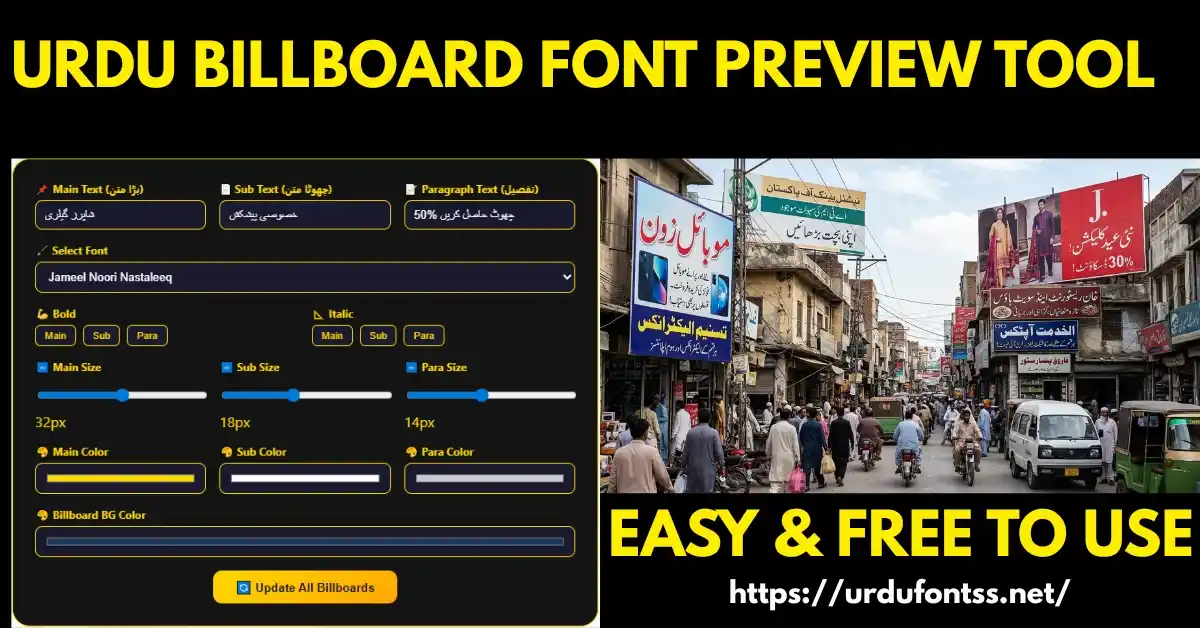
Urdu Billboard Font Preview Tool

The Urdu Billboard Font Preview Tool shows your own Urdu text on four real billboard mockups — a landscape highway board, a portrait board, a digital LED screen, and a shop sign — before you commit to printing or pitching a client. Pick one of the four fonts, type your text, adjust size and colours, and download the result as a PNG. It runs in the browser with no signup.
Table of Content
Table of Contents
What This Tool Does
- Four billboard mockups: landscape highway board, portrait board, digital LED screen, and shop sign — switch between them to see how your text reads at outdoor scale.
- Four Urdu fonts built in: Jameel Noori Nastaleeq, Shamsheer Unicode, Urdu Naskh Unicode, and SF Koonj Regular — each renders with proper Urdu shaping in the preview.
- Full styling controls: type your text, change the font size, text colour, and billboard background colour, and toggle Bold or Italic.
- Free PNG download: export the finished mockup as an image for your portfolio or client presentation. No signup, no watermark, no payment.
How to Use the Tool — Step by Step
- Type your text in the text input box — the billboard updates as you type.
- Choose a font from the font dropdown: Jameel Noori Nastaleeq for traditional signage, Shamsheer for plain announcements, Urdu Naskh for clean small text, SF Koonj for a warmer feel.
- Pick a billboard type — Landscape, Portrait, Digital LED, or Shop — to match the job you are designing for.
- Style the text: adjust the font size, set the text colour and the billboard background colour, and toggle Bold or Italic if the message needs more weight.
- Copy or download: use Copy to move the text elsewhere, or click Download to save the mockup as a PNG image.
What You Can Export
- PNG image: the Download button saves the current billboard mockup as a PNG — use it in client proposals, portfolios, or social posts.
- Copy text: the Copy button copies the preview text for pasting into your design app.
- Fonts themselves: to use a font in your own software, download its TTF from the font’s page — for example Jameel Noori Nastaleeq — and install it with our PC install guide.
Tips for Best Results
- Keep the message short: billboards are read at speed — one headline of three to five words beats a paragraph.
- High contrast wins outdoors: dark text on a light board, or light text on a dark board — test both with the colour controls.
- Try every mockup: a design that works on a landscape board can fail on a portrait one — switch types before you commit.
- Test the font choice against the brief: Nastaliq suits traditional brands; a plain Naskh reads fastest for announcements. For more display options, preview them in our Live Urdu Font Previews tool and compare.
Troubleshooting
- Text looks disconnected: the tool renders with the selected font’s own shaping — all four built-in fonts shape Urdu correctly. If you pasted text from elsewhere, retype it in the input box.
- Download does nothing: allow the browser’s download for this site and try again; ad blockers occasionally interfere with the export script — disabling the blocker for this page fixes it.
- Mockup looks blurry on a big screen: the PNG exports at the tool’s working resolution, which is fine for client mockups and social posts — for the final print file, set the same font and text in your design software.
Common Problems & Solutions
| Problem | Solution |
|---|---|
| The font I want isn’t in the dropdown | The tool ships with four fonts — to test others, preview them in the Live Urdu Font Previews tool, then download the font for your own software |
| Download button gives no file | Allow downloads for this site in the browser, and disable ad blockers on this page |
| Text overflows the billboard | Reduce the font size or shorten the message — billboards work best with 3–5 words |
| Colours look different in the PNG | The export keeps the on-screen colours — calibrate your monitor if prints differ |
Final Words
A billboard decision is expensive to reverse — this tool lets you make it cheaply. Type the exact message, try it in all four fonts and all four mockups, and download the PNG for your client or your own print run. For the full signage-typeface rundown, see our best Urdu fonts for billboards guide.
Frequently Asked Questions (FAQs)
What is the Urdu Billboard Font Preview Tool?
A free browser tool that renders your Urdu text on four billboard mockups — landscape, portrait, digital LED and shop sign — with four built-in Urdu fonts, styling controls and PNG download.
Is this tool free to use?
Yes — the tool and the PNG downloads are free, with no signup and no watermark.
Can I use the downloaded billboard images commercially?
The mockup image itself is yours to use in proposals and portfolios. If the design goes to print, check the licence of the font you chose for commercial use.
Does the tool work on mobile?
Yes — the tool runs in mobile browsers. For fine colour and size adjustments, a desktop screen is more comfortable.
Which fonts can I preview in the tool?
Four built-in Urdu fonts: Jameel Noori Nastaleeq, Shamsheer Unicode, Urdu Naskh Unicode and SF Koonj Regular — all render with proper Urdu shaping.
What size does the downloaded PNG come in?
The PNG exports at the tool’s working resolution — suitable for client mockups, portfolios and social posts. For final print, rebuild the design in your layout software with the same font.
Can I download the fonts themselves from this tool?
The tool exports the mockup image, not the font files. Download any font’s TTF from its page on this site — and see our font preview tools roundup for more testing options.