How to Use Urdu Fonts in Adobe Illustrator – Complete Guide 2026

Table of Content
Table of Contents
Introduction
Kya aap urdu fonts in adobe illustrator use karna chahte hain? Adobe Illustrator duniya ka sab se popular vector graphics software hai. Graphic designers, logo designers, aur typography experts Illustrator use karte hain.
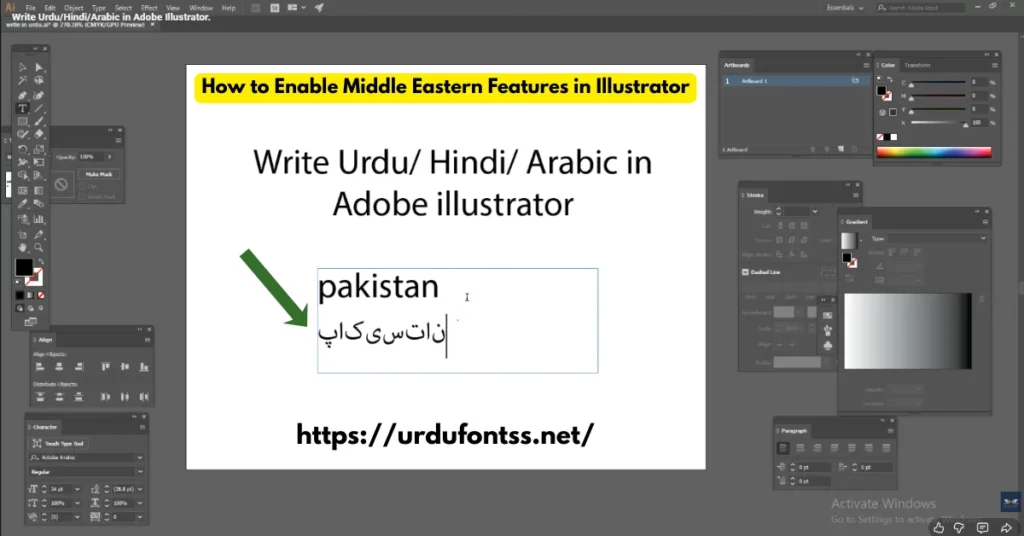
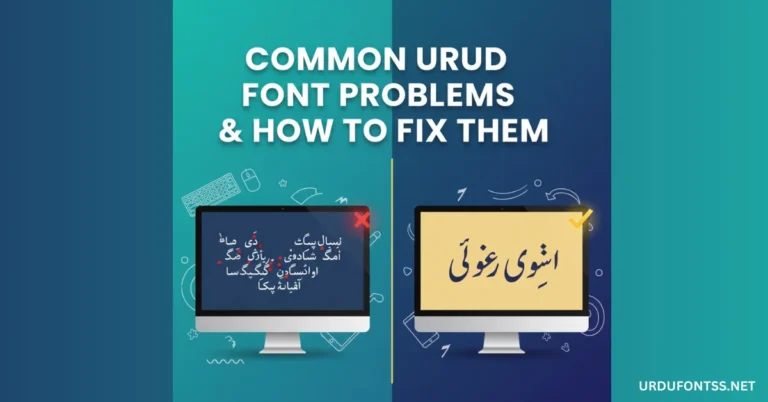
Lekin urdu fonts in adobe illustrator use karte waqt kuch mushkilat aa sakti hain. Urdu text reverse ho jata hai, letters disconnect ho jate hain, ya boxes show hotay hain. Is guide mein main aapko sab kuch step by step bataonga.
Is guide mein aap seekhoge:
- Urdu fonts in adobe illustrator install kaise karein
- Middle Eastern features enable kaise karein
- Urdu text in adobe illustrator type kaise karein
- Common problems aur unke solutions
- Best urdu calligraphy fonts illustrator ke liye
Agar aap Urdu fonts dekhna chahte hain to https://urdufontss.net/category/urdu-fonts/ visit karein.
https://urdufontss.net/how-to-download-and-install-urdu-fonts-from-trusted-website/ mein font installation ki detail guide hai.
Why Use Urdu Fonts in Adobe Illustrator?
Urdu fonts in adobe illustrator use karne ke bohat fayde hain:
| Benefit | Explanation |
|---|---|
| Professional Logos | Urdu mein professional logo design |
| Branding | Urdu branding for local businesses |
| Packaging Design | Urdu product labels and packaging |
| Social Media Graphics | Urdu posts for social media |
| Print Design | Urdu brochures, flyers, banners |
Graphic designers ke liye urdu fonts in adobe illustrator aik essential skill hai.
https://urdufontss.net/best-urdu-fonts-for-billboards-digital-signage/ mein billboards ke liye best fonts ki guide hai.
https://urdufontss.net/best-urdu-calligraphy-fonts-for-wedding-cards/ mein wedding cards ke liye best fonts hain.
How to Install Urdu Fonts on Windows/Mac
Urdu fonts in adobe illustrator use karne se pehle fonts install karna zaroori hai.
For Windows:
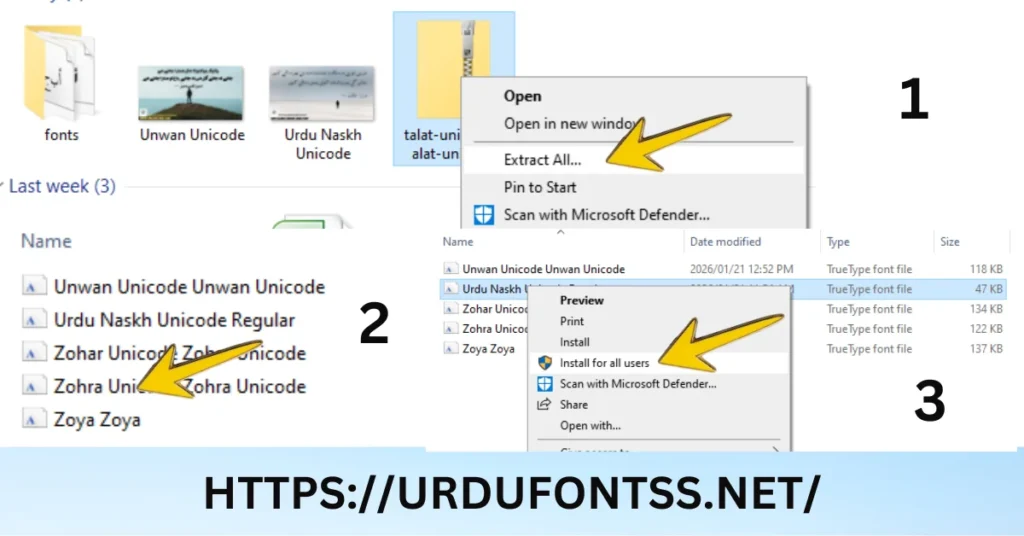
- Step 1: https://urdufontss.net/ se Unicode Urdu font download karein
- Step 2: ZIP file extract karein
- Step 3: TTF file pe right-click karein
- Step 4: Install option select karein
- Step 5: Illustrator restart karein
For Mac:
- Step 1: TTF file download karein
- Step 2: File pe double-click karein
- Step 3: Font Book app mein Install Font click karein
- Step 4: Illustrator restart karein
Font install hone ke baad aap urdu fonts in adobe illustrator use kar sakte hain.
https://urdufontss.net/jameel-noori-nastaleeq-urdu-font-download/ se Jameel Noori font download kar sakte hain.
https://urdufontss.net/shamsheer-unicode-shamsheer-unicode-font/ se Shamsheer Unicode download kar sakte hain.
https://urdufontss.net/urdu-naskh-unicode-regular-free-urdu-font-download/ se Urdu Naskh Unicode download kar sakte hain.
How to Enable Middle Eastern Features in Illustrator
Urdu fonts in adobe illustrator ke liye sab se important step hai Middle Eastern features enable karna.
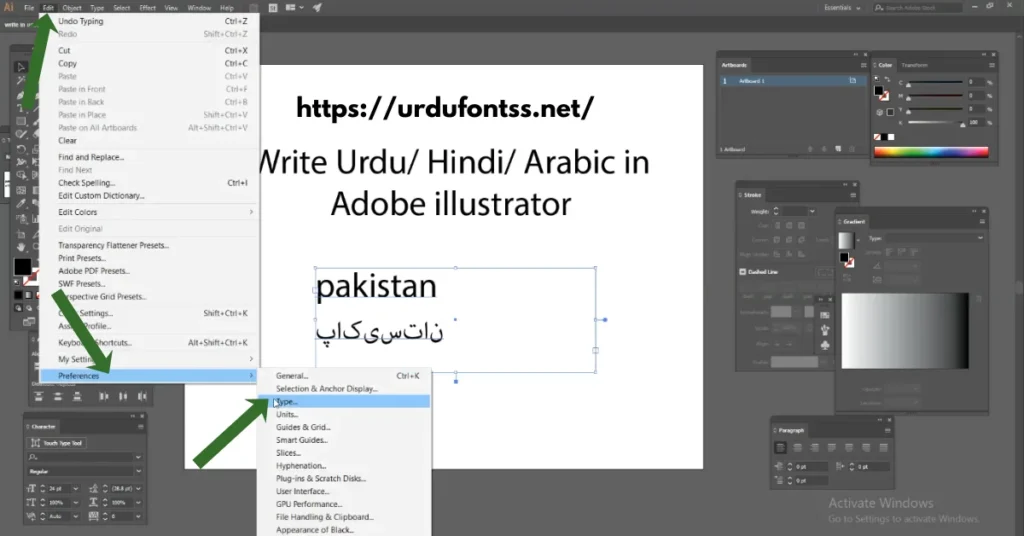
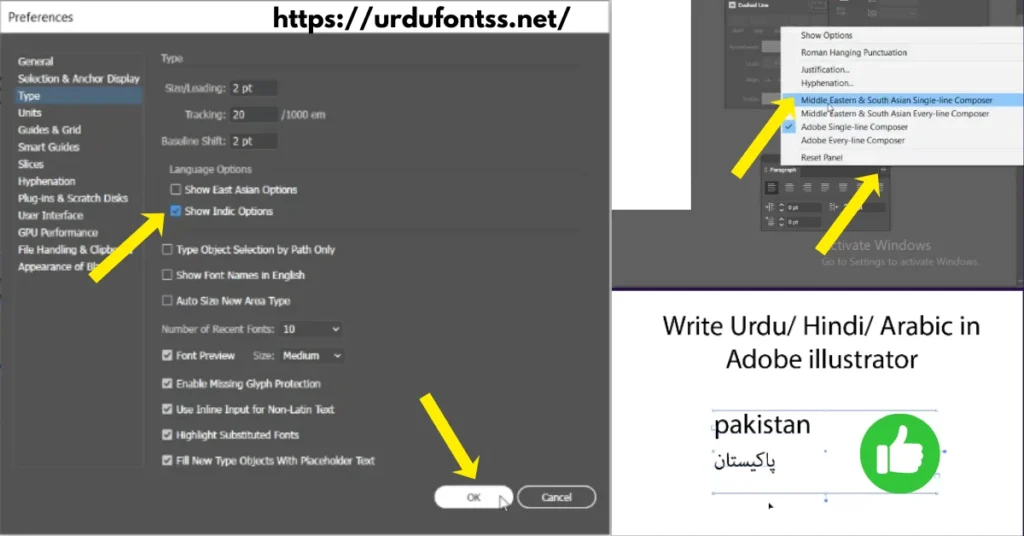
Step by Step Guide:
- Step 1: Adobe Illustrator open karein
- Step 2: Edit > Preferences > Type pe click karein (Windows)
- Step 3: Mac mein Illustrator > Preferences > Type
- Step 4: Show Asian Text Options check karein
- Step 5: Middle Eastern Features select karein
- Step 6: OK pe click karein
- Step 7: Illustrator restart karein
Note: Middle Eastern features enable karne ke baad urdu text in adobe illustrator right-to-left direction mein properly type hoga.
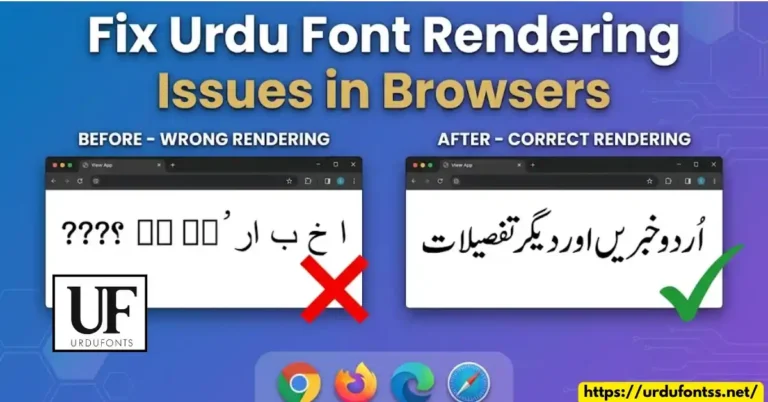
https://urdufontss.net/fix-urdu-font-rendering-issues-in-browsers/ mein browser rendering issues ka solution hai.
https://urdufontss.net/fix-urdu-fonts-showing-boxes-or-question-marks/ mein boxes aur question marks ka solution hai.
How to Type Urdu Text in Adobe Illustrator
Middle Eastern features enable karne ke baad urdu fonts in adobe illustrator type karne ka tareeqa:
Method 1: Using Urdu Keyboard
- Step 1: Windows mein Urdu keyboard enable karein
- Step 2: Illustrator mein Type Tool (T) select karein
- Step 3: Artboard pe click karein
- Step 4: Character panel mein Urdu font select karein
- Step 5: Urdu keyboard switch karein (Windows + Space)
- Step 6: Urdu text type karein
Method 2: Copy-Paste Method
- Step 1: MS Word ya Google Docs mein Urdu text type karein using urdu fonts in adobe illustrator compatible font
- Step 2: Text copy karein (Ctrl + C)
- Step 3: Illustrator mein paste karein (Ctrl + V)
- Step 4: Text select karein aur desired font apply karein
Method 3: Using Paragraph Panel
- Step 1: Window > Type > Paragraph open karein
- Step 2: Paragraph panel mein Right-to-Left direction select karein
- Step 3: Text type karein
https://urdufontss.net/use-urdu-fonts-in-google-docs/ mein Google Docs mein Urdu fonts use karne ki guide hai.
How to Fix Urdu Font Rendering Issues in Illustrator
Urdu fonts in adobe illustrator mein kabhi kabhi rendering issues aate hain:
| Problem | Solution |
|---|---|
| Text reversed (left to right) | Middle Eastern features enable karein |
| Letters disconnected | Nastaleeq font use karein (Jameel Noori) |
| Boxes instead of text | Unicode font use karein |
| Font not showing | Font reinstall karein, Illustrator restart karein |
| Text not selectable | Text to outlines convert karein |
| Copy-paste issues | Paste without formatting try karein |
Pro Tip: Hamesha Unicode fonts use karein urdu fonts in adobe illustrator ke liye.
https://urdufontss.net/common-urdu-font-problems/ mein common font problems ke solutions hain.
https://urdufontss.net/how-to-recover-corrupted-urdu-font-files/ mein corrupted fonts recover karne ka guide hai.
Best Urdu Fonts for Adobe Illustrator
Urdu fonts in adobe illustrator ke liye yeh 10 best fonts hain:
Best urdu fonts for adobe illustrator design mein Jameel Noori aur Shamsheer top hain.
https://urdufontss.net/live-urdu-font-previews-tool/ se aap fonts pehle preview kar sakte hain.
How to Convert Urdu Text to Outlines in Illustrator
Urdu fonts in adobe illustrator mein text to outlines convert karna bohat useful hai:
Why Convert to Outlines?
- Font missing hone ka problem nahi hoga
- Printing ke liye safe hai
- Text ko edit nahi kiya ja sakta (client proof)
Step by Step:
Step 1: Urdu text select karein
Step 2: Type > Create Outlines pe click karein (Ctrl + Shift + O)
Step 3: Text shapes mein convert ho jayega
Step 4: Ab yeh font-independent hai
⚠️ Note: Outlines convert karne ke baad text edit nahi ho sakta. Isliye pehle editing complete kar lein.
https://urdufontss.net/how-to-embed-urdu-fonts-in-pdf-files/ mein PDF mein fonts embed karne ki guide hai.
How to Import Urdu Text from Other Sources
Urdu fonts in adobe illustrator mein text import karne ke tareeqe:
From Microsoft Word:
Step 1: Word mein Unicode Urdu font mein text type karein
Step 2: Text copy karein (Ctrl + C)
Step 3: Illustrator mein paste karein (Ctrl + V)
Step 4: Keep Source Formatting select karein
From Google Docs:
Step 1: Google Docs mein text type karein using urdu fonts in adobe illustrator
Step 2: Text copy karein
Step 3: Illustrator mein paste karein
From InPage:
Step 1: InPage se text Unicode mein convert karein using https://urdufontss.net/inpage-to-unicode-converter-urdu-text/
Step 2: Illustrator mein paste karein
https://urdufontss.net/unicode-to-inpage-converter/ mein Unicode to Inpage converter bhi available hai.
Professional Design Tips for Urdu Typography in Illustrator
Urdu fonts in adobe illustrator ke liye professional tips:
| Tip | Explanation |
|---|---|
| Use 2 Fonts Maximum | Ek heading ke liye, ek body text ke liye |
| Maintain Hierarchy | Important text bold aur bada rakhein |
| Use Appropriate Leading | Line spacing 1.5 for body text |
| Kerning for Headings | Headings mein letter spacing adjust karein |
| Color Contrast | Dark background pe light text |
| Align Properly | Right-to-left alignment use karein |
Pro Tip: Hamesha urdu fonts in adobe illustrator ke liye outline preview use karein (View > Outline).
https://urdufontss.net/best-urdu-fonts-for-magazines/ mein magazines ke liye best fonts ka guide hai.
https://urdufontss.net/best-urdu-fonts-for-ebooks-and-kindle/ mein e-books ke liye best fonts hain.
Common Problems and Solutions
| Problem | Solution |
|---|---|
| Urdu text showing reverse | Middle Eastern features enable karein |
| Letters not connecting | Nastaleeq font use karein |
| Font list mein Urdu font nahi | Font reinstall karein, Illustrator restart karein |
| Copy-paste se formatting bigadti hai | Paste without formatting use karein |
| Text to outlines se letters disconnect | Nastaleeq font ke saath yeh normal hai, manually adjust karein |
| Illustrator slow with Urdu text | Font cache clear karein |
https://urdufontss.net/fix-urdu-font-rendering-issues-in-browsers/ mein browser rendering issues ka solution hai.
Other Urdu Fonts You May Like
Aur bhi urdu fonts in adobe illustrator ke liye https://urdufontss.net/category/urdu-fonts/ visit karein.
https://urdufontss.net/best-urdu-fonts-for-instagram-stories-and-posts/ mein Instagram ke liye best fonts hain.
Why Choose UrduFontss.Net for Illustrator Fonts?
| Feature | Benefit |
|---|---|
| 500+ Fonts | Sab se bara Urdu fonts collection |
| TTF Format | Illustrator compatible |
| Unicode Compliant | Proper rendering in Illustrator |
| 100% Safe | Virus-free aur tested fonts |
| Free Tools | Font preview aur converters |
Free Tools:
- https://urdufontss.net/live-urdu-font-previews-tool/
- https://urdufontss.net/inpage-to-unicode-converter-urdu-text/
- https://urdufontss.net/unicode-to-inpage-converter/
- https://urdufontss.net/cute-fonts-text-generator/
Final Thoughts
Urdu fonts in adobe illustrator use karna bohat easy hai agar aap sahi steps follow karein. Is article mein humne cover kiya:
| Topic | Key Takeaway |
|---|---|
| Font Installation | TTF files install karein |
| Middle Eastern Features | Illustrator mein enable karna zaroori hai |
| Typing Methods | Urdu keyboard ya copy-paste |
| Best Fonts | Jameel Noori, Shamsheer, Urdu Naskh |
| Troubleshooting | Rendering issues ka solution |
Key Takeaways:
- Hamesha unicode urdu fonts in adobe illustrator use karein
- Middle Eastern features enable karna na bhoolain
- Nastaleeq fonts traditional look ke liye best hain
- Naskh fonts body text ke liye best hain
Ab aap asani se urdu fonts in adobe illustrator use kar sakte hain. Agar koi problem ho to https://urdufontss.net/contact-us/ par rabta karein.
Frequently Asked Questions (FAQs)
How to enable Urdu typing in Adobe Illustrator?
Edit > Preferences > Type mein jayein, “Middle Eastern Features” enable karein aur “Show Asian Text Options” check karein. Illustrator restart karein.
Why is Urdu text not showing correctly in Illustrator?
Middle Eastern features enable nahi hain ya aap non-Unicode font use kar rahe hain. Unicode font use karein aur Middle Eastern features enable karein.
Which Urdu fonts work best in Adobe Illustrator?
Jameel Noori Nastaleeq, Shamsheer Unicode, aur Urdu Naskh Unicode urdu fonts in adobe illustrator ke liye best hain.
How to fix disconnected Urdu letters in Illustrator?
Nastaleeq font use karein jaise Jameel Noori Nastaleeq. Yeh letters properly connect karta hai.
Can I copy-paste Urdu text from Word to Illustrator?
Haan, lekin ensure karein ke font Illustrator mein installed hai aur Middle Eastern features enable hain.
How to convert Urdu text to outlines in Illustrator?
Text select karein, Type > Create Outlines (Ctrl + Shift + O) pe click karein.
Disclaimer: Yeh fonts personal use ke liye provide kiye ja rahe hain. Urdu fonts in adobe illustrator use karte waqt font licensing check kar lein.
DMCA Copyright Note: If you are the original creator of any font and believe your rights have been violated, please contact us at urdufontss@gmail.com with proof of ownership.
📌 Important Note: Hamari website ka main maqsad aap ko free Urdu fonts provide karna hai. Urdu fonts in adobe illustrator use karte waqt ensure karein ke font Unicode hai aur Middle Eastern features enable hain.


 Join Channel
2 Comments