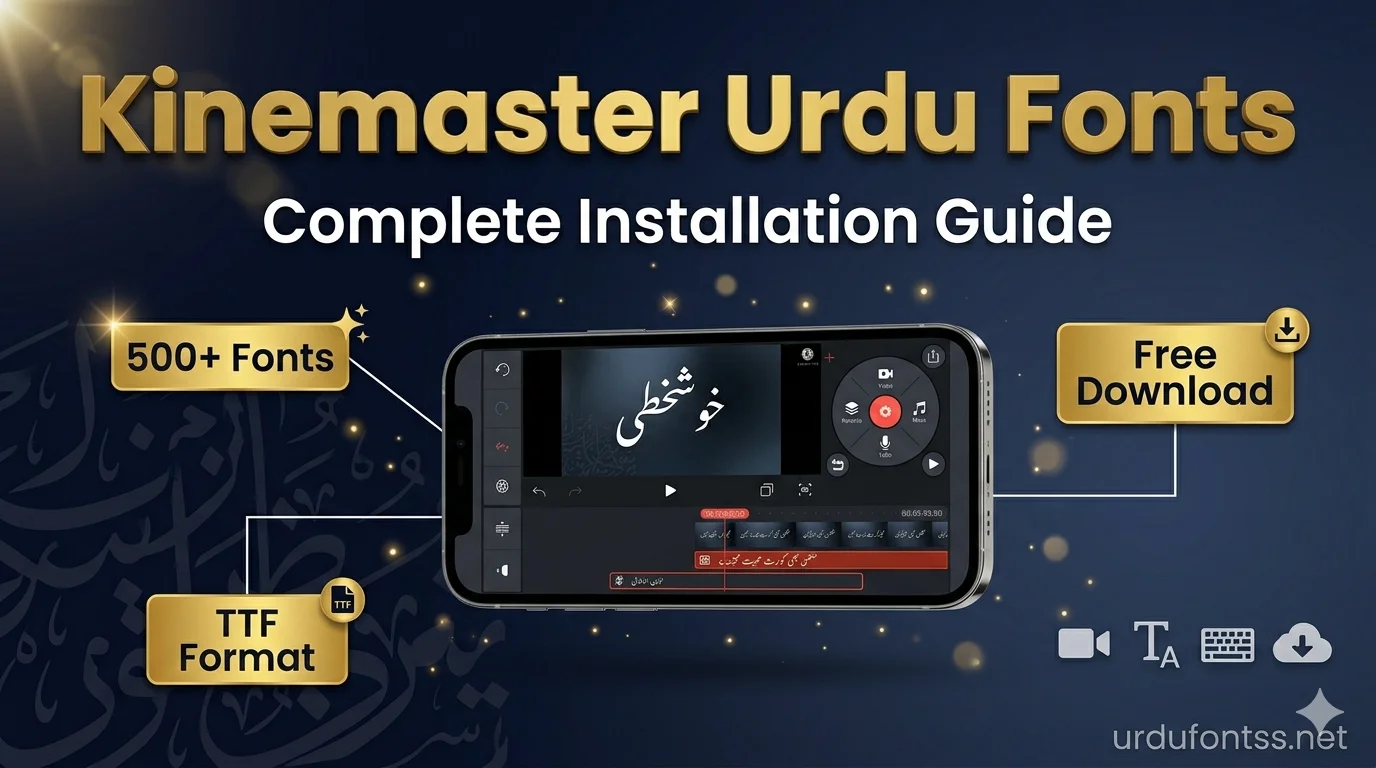
How to Use Urdu Fonts in Kinemaster – Complete Step by Step Guide

Table of Content
Table of Contents
Introduction – how to use urdu fonts in kinemaster
Doston kya aap how to use urdu fonts in kinemaster seekhna chahte hain? Agar aap Urdu content creator hain to yeh guide aapke liye hai.
Kinemaster ek bohat popular video editing app hai jo Android aur iOS dono par available hai. Isme aap professional videos bana sakte hain lekin ek problem hai – Kinemaster mein default Urdu fonts nahi hote. Is article mein main aapko step by step batane ja raha hoon ke aap Kinemaster mein Urdu fonts kaise add kar sakte hain aur unhe apni videos mein kaise use kar sakte hain.
Is guide mein aap seekhoge: how to use urdu fonts in kinemaster step by step complete guide.
- Kinemaster kya hai aur kyun use karte hain log
- Urdu fonts kahan se download karein
- Kinemaster mein fonts kaise add karein
- Common errors kaise fix karein
- Best Urdu fonts for Kinemaster
- Professional video editing tips
Agar aap pehle se Urdu fonts ki collection dekhna chahte hain to https://urdufontss.net/category/all-fonts/ yeh link visit karein.
What is Kinemaster? – How to use urdu fonts in kinemaster
Kinemaster ek professional video editing app hai jo mobile devices ke liye banayi gayi hai. Yeh app Android aur iOS dono par free available hai. Isme aap multiple layers, transitions, effects, aur text add kar sakte hain.Aur yeh process main aapko how to use urdu fonts in kinemaster mein detail mein sikhaonga.
Kinemaster Ki Khaas Baatein
- Multiple video layers
- Chroma key (green screen)
- Speed control (slow motion/fast motion)
- Audio editing
- Text and titles
- Transitions and effects
- Voiceover recording
Lekin Kinemaster mein default Urdu fonts nahi hote. Agar aap Urdu text add karna chahte hain toh aapko custom fonts add karne hote hain. Aur yeh process main aapko aaj sikhaonga.
Agar aap Kinemaster jaise dusre apps mein bhi Urdu fonts use karna chahte hain to https://urdufontss.net/install-urdu-fonts-in-capcut/ yeh guide bhi helpful rahegi.
Why Use Urdu Fonts in Kinemaster?
Urdu content creators ke liye Urdu fonts use karna bohat zaroori hai. Iske bohat saare reasons hain. Pehle samajhte hain kyun how to use urdu fonts in kinemaster seekhna important hai for content creators.
1. Urdu Audience Connect
Pakistan aur India mein Urdu speaking audience bohat badi hai. Agar aap unke liye content bana rahe hain toh unki language mein text dena better hota hai. Audience apni language mein content dekhna pasand karti hai.
2. Professional Look
Jab aap Urdu fonts use karte hain toh aapki videos professional lagti hain. Log aapki videos ko seriously lete hain aur aapki channel ki credibility badhti hai.
3. Unique Identity
Agar aap unique Urdu fonts use karte hain toh aapki videos alag dikhti hain. Bohat saare creators wohi purane fonts use karte hain. Agar aap stylish fonts choose karte ho toh aap standout karte ho.
4. Better Engagement
Urdu text wali videos par audience zyada engage hoti hai. Comments, likes, shares sab increase hote hain.
5. YouTube Thumbnails Ke Liye
Kinemaster mein aap YouTube thumbnails bhi bana sakte hain. Urdu fonts use karne se aapke thumbnails bhi professional lagte hain.
Agar aap YouTube thumbnails ke liye best fonts dhundh rahe hain to https://urdufontss.net/best-free-urdu-fonts-for-youtube-thumbnails/ yeh article zaroor padhein.
Best Urdu Fonts for Kinemaster – Top 10 Recommendations
Doston ab main aapko top 10 Urdu fonts batane ja raha hoon jo Kinemaster mein bohat achi lagti hain. Yeh sab fonts https://urdufontss.net/ se free download kar sakte hain.
1. Jameel Noori Nastaleeq
Yeh sabse popular Urdu font hai. Isme traditional Nastaleeq style hai jo Urdu newspapers aur books mein use hota hai. Kinemaster videos mein classic look ke liye best hai.
2. Shamsheer Unicode
Yeh bold aur strong Urdu font hai. Video titles aur headings ke liye perfect hai. Door se bhi clear dikhta hai.
3. SF Koonj Regular
Yeh stylish Urdu font hai. Modern videos aur social media content ke liye bohat acha lagta hai.
4. Urdu Naskh Unicode
Yeh clean aur clear Urdu font hai. Mobile screens par bohat readable hai. Educational videos ke liye best.
5. Ul Noreen Bold Regular
Yeh bold Urdu font hai. Video headings aur titles ke liye use karein. Bohat impactful lagta hai.
6. Zohra Unicode
Yeh elegant Urdu font hai. Wedding videos, fashion content, aur feminine touch ke liye perfect.
7. Tafseer Regular
Yeh Islamic content ke liye best Urdu font hai. Quranic verses aur Islamic videos ke liye bohat acha lagta hai.
8. Ul Sajid Heading Regular
Yeh heading ke liye perfect Urdu font hai. Video titles aur section headings mein bohat acha lagta hai.
9. Tehreer Regular
Yeh modern Urdu font hai. Logo design aur branding ke liye use kar sakte hain. Clean aur minimal hai.
10. Ul Amjad Regular
Yeh traditional Urdu font hai. Calligraphy style mein hai. Islamic videos aur naat videos ke liye bohat acha lagta hai.
Aur bhi fonts dekhne ke liye https://urdufontss.net/category/urdu-fonts/ yeh category visit karein.
Where to Download Urdu Fonts for Kinemaster?
Ab main aapko batata hoon ke aap safe aur virus-free Urdu fonts kahan se download kar sakte hain.
UrduFontss.Net – Aapka Best Source
https://urdufontss.net/ specifically Urdu fonts ke liye banayi gayi website hai. Yahan aapko:
- 500+ free Urdu fonts milenge
- Sab fonts TTF format mein hain
- 100% safe aur virus-free downloads
- Har font ke saath installation guide bhi hai
- Regular updates hoti rehti hain
Why Choose UrduFontss.Net?
Main personally ensure karta hoon ke jo fonts yahan upload ho rahe hain woh properly tested hain. Main khud har font ko test karta hoon Windows, Mac aur mobile pe.
Aap pehle https://urdufontss.net/live-urdu-font-previews-tool/ yeh tool use kar sakte ho. Is tool mein aap apna text type kar ke dekh sakte ho ke woh font aapke video mein kaisa lag raha hai.
https://urdufontss.net/about-us/ par hamare baare mein mazeed information hai.
How to Download Urdu Fonts in kinemaster from UrduFontss.Net
Doston ab main step by step batata hoon ke aap website se Urdu fonts kaise download kar sakte hain.
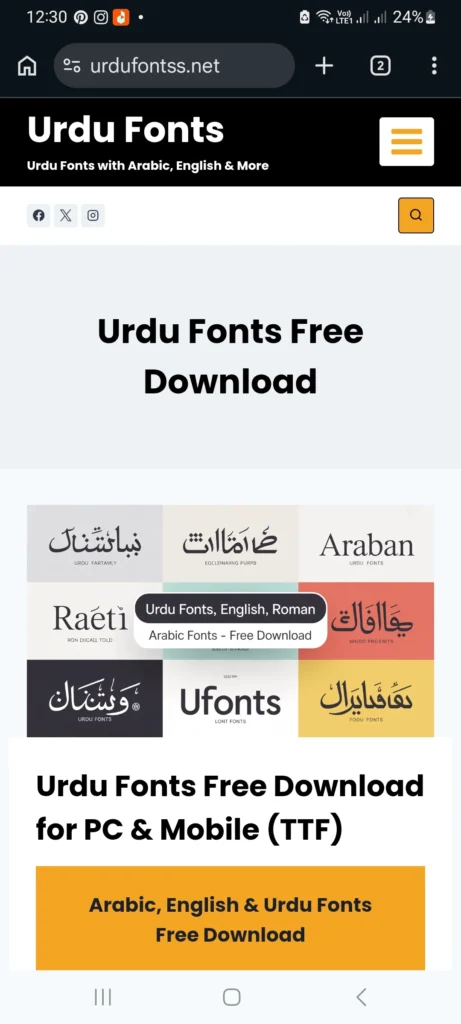
Step 1: Website Open Karein
Apne mobile browser mein open karein https://urdufontss.net/
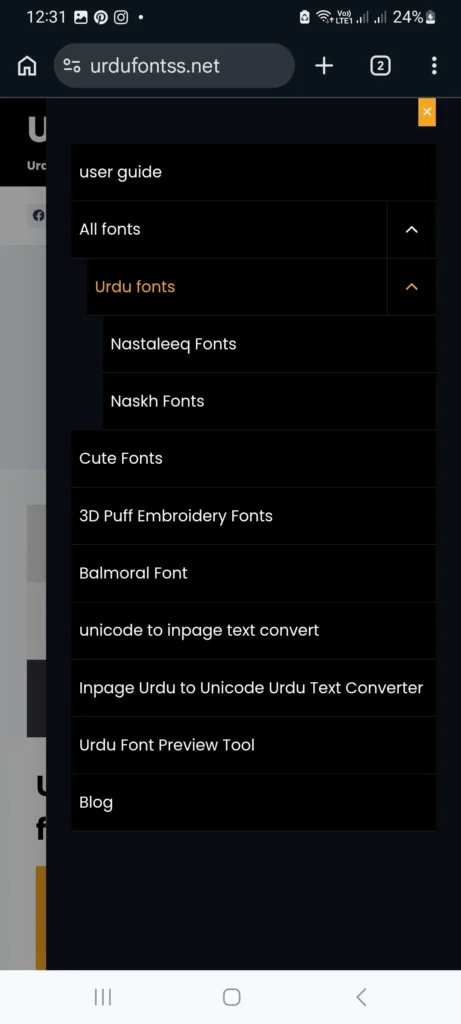
Step 2: Font Search Karein
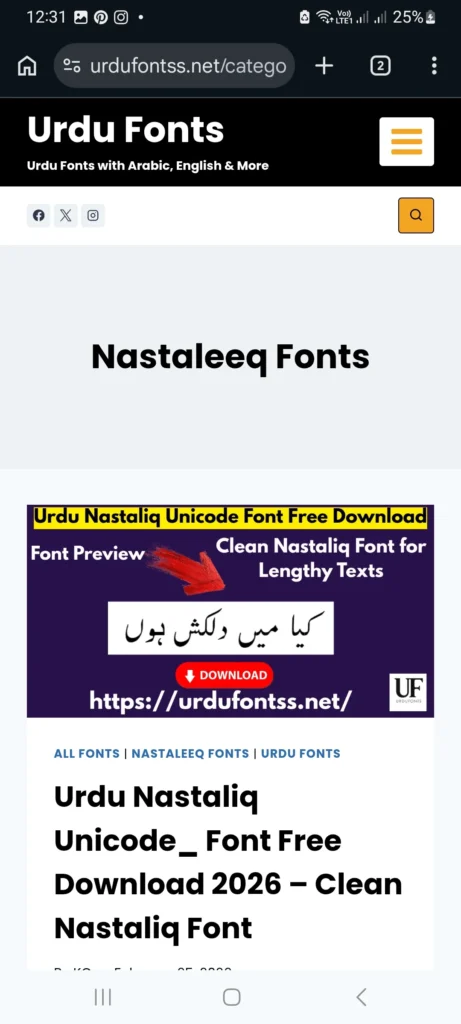
https://urdufontss.net/category/all-fonts/ mein jaakar font search karein ya search bar mein font ka naam type karein.
Step 3: Font Article Open Karein
Jo font aap download karna chahte hain us article pe click karein.
Step 4: Download Link Pe Click Karein
Article ke andar download button hoga. Uspe click karein.
Step 5: Human Verification Complete Karein
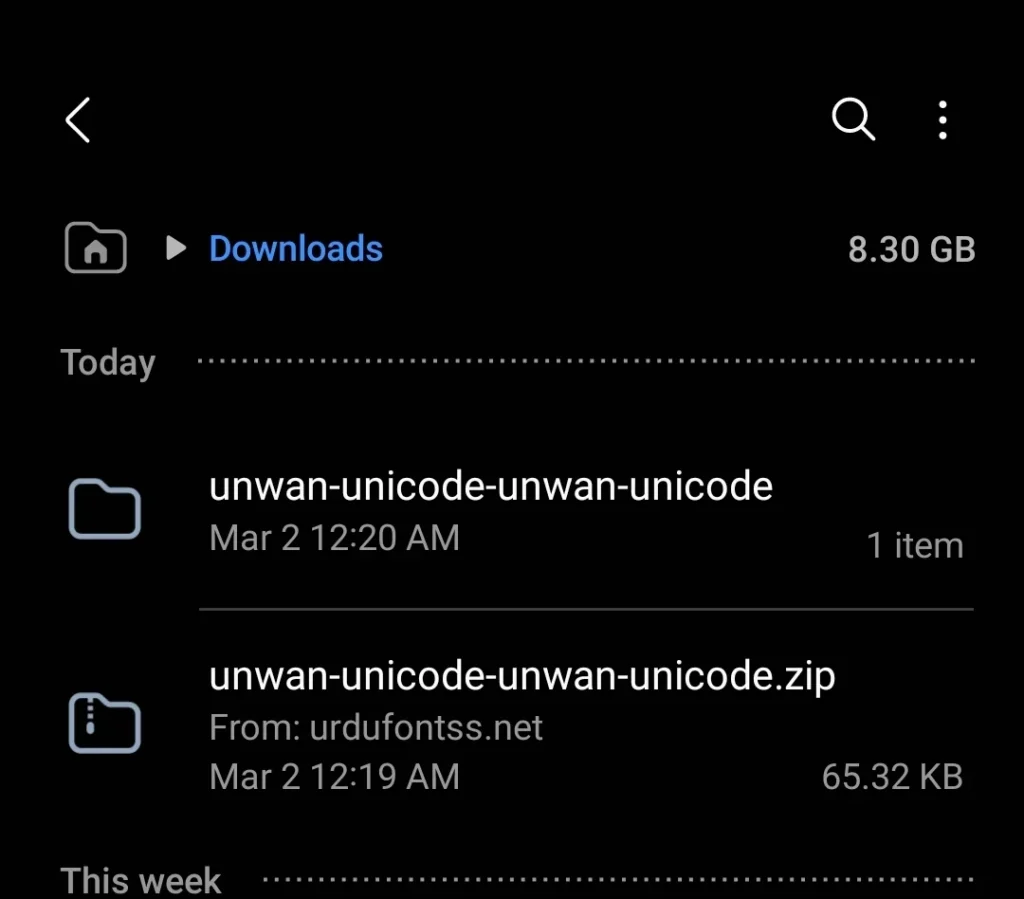
Aapko ek simple human verification karna hoga. Verification ke baad download automatically start hojayega.
Step 6: ZIP File Download Hogi
Font TTF format mein ZIP file mein aati hai. Ye ZIP file aapke phone ke “Downloads” folder mein save hojayegi.
Agar download mein problem aati hai to https://urdufontss.net/contact-us/ par rabta karein.
How to Install Urdu Fonts in Kinemaster – Step by Step
Yeh article ka sabse important section hai. Doston main aapko bilkul step by step batata hoon ke Urdu fonts ko Kinemaster mein kaise add karte hain.
Step 1: Extract ZIP File
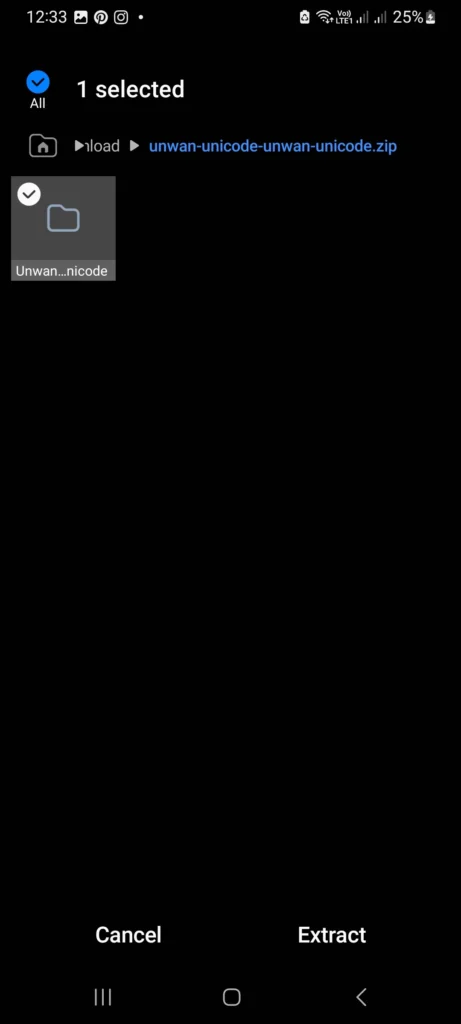
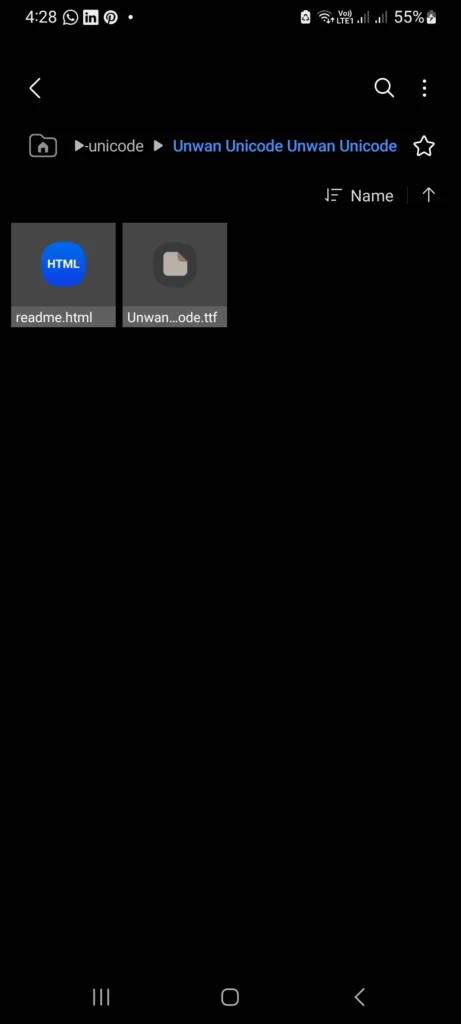
Jab aap font download karte ho toh woh ZIP file mein aati hai. Aapko pehle usay extract karna hoga taake TTF file mil sake.
Using ZArchiver App: (Method 1)
- Google Play Store se “ZArchiver” app download karein
- ZArchiver open karein
- “Downloads” folder mein jaayein
- ZIP file tap karein
- “Extract” option select karein
- Extract location choose karein
Using Default File Manager: (Method 2)
- Phone ka default file manager open karein
- Downloads folder mein jaayein
- ZIP file tap karein
- “Extract” ya “Extract All” option select karein
Step 2: Create Fonts Folder for Kinemaster (old Versions)
Kinemaster ke liye alag se folder banana hota hai.
✅ Attention: Dostun Fonts Folder Old Verisons me Create krna hota tha Manual, Aj kal jo New Kinemasters k versions a rhy hain us me ap direct Kinemaster k under sy Font Add kr sakte hain To Agar ap New Version install kr rhy hain ro create Folder waly Step ko Skip Kre!
Folder Location:
text
Internal Storage > Kinemaster > Fonts
Step by Step:
- File manager open karein
- “Internal Storage” ya “Phone Storage” mein jaayein
- “Kinemaster” folder dhundhein (agar nahi hai to app ek baar open karein)
- Kinemaster folder ke andar “Fonts” naam ka folder create karein
Important: Folder ka naam exactly “Fonts” hona chahiye (capital F).
Step 3: Copy TTF File to Fonts Folder
- Extracted TTF file copy karein
- Internal Storage > Kinemaster > Fonts folder mein paste karein
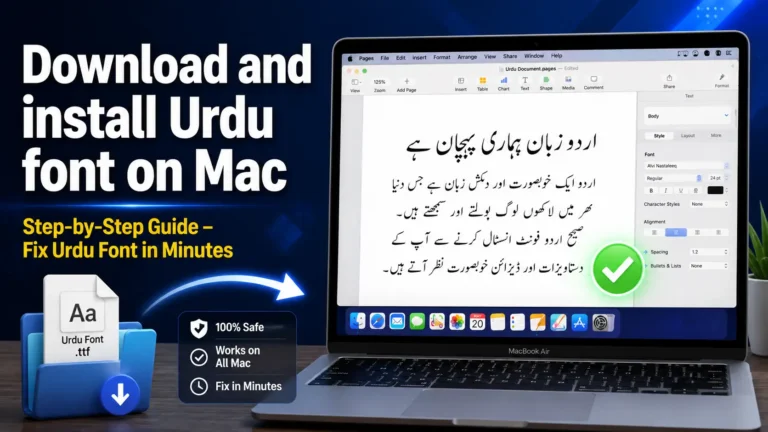
Step 4: Install Urdu Keyboard (Important)
Fonts add karne ke baad aapko Urdu keyboard bhi install karna hoga. Warna aap fonts to dekh sakte ho lekin Urdu text type nahi kar sakoge.
Urdu Keyboard Install Kaise Karein: (Method 1)
Apne Mobile ki > Settings me Jayen Wahan > Keyboard Settings me jayen > Urdu Language Add kren or Urdu Keyboard Use kren.
Urdu Keyboard Install Kaise Karein: (Method 2)
- Google Play Store se “Gboard” install karein
- Settings > Language & Input > Gboard select karein
- Languages > Add Keyboard > Urdu select karein
- Urdu keyboard enable karein
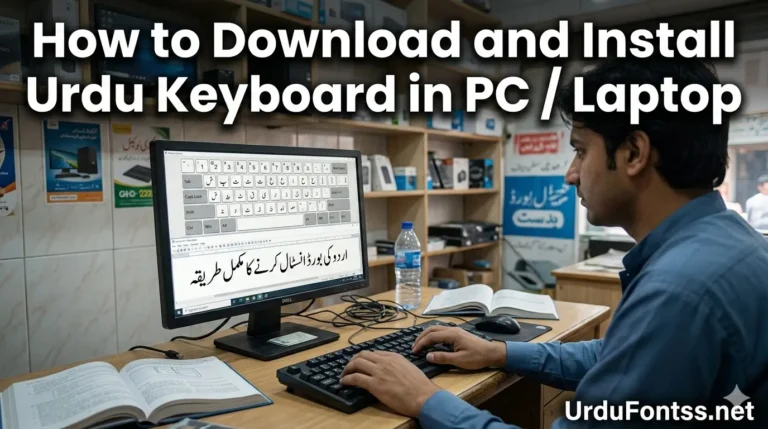
Agar detail guide chahiye to https://urdufontss.net/download-and-install-urdu-keyboard-in-pc/ yeh article padhein.
Step 5: Open Kinemaster App
Ab fonts install ho chuke hain. Aap Kinemaster app open karein.
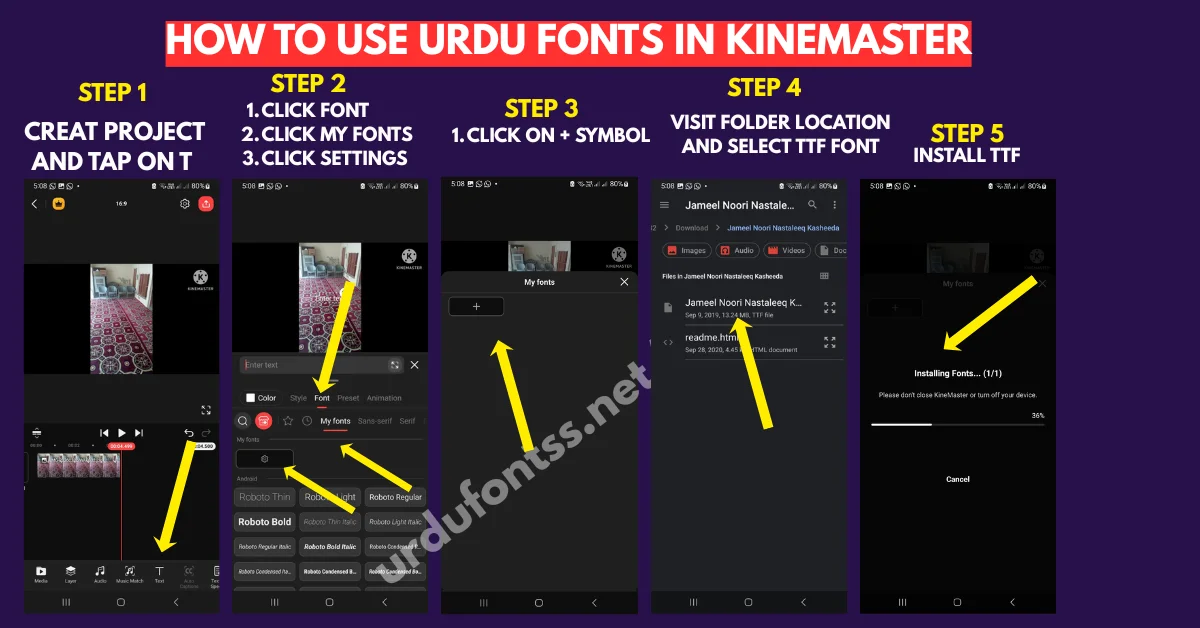
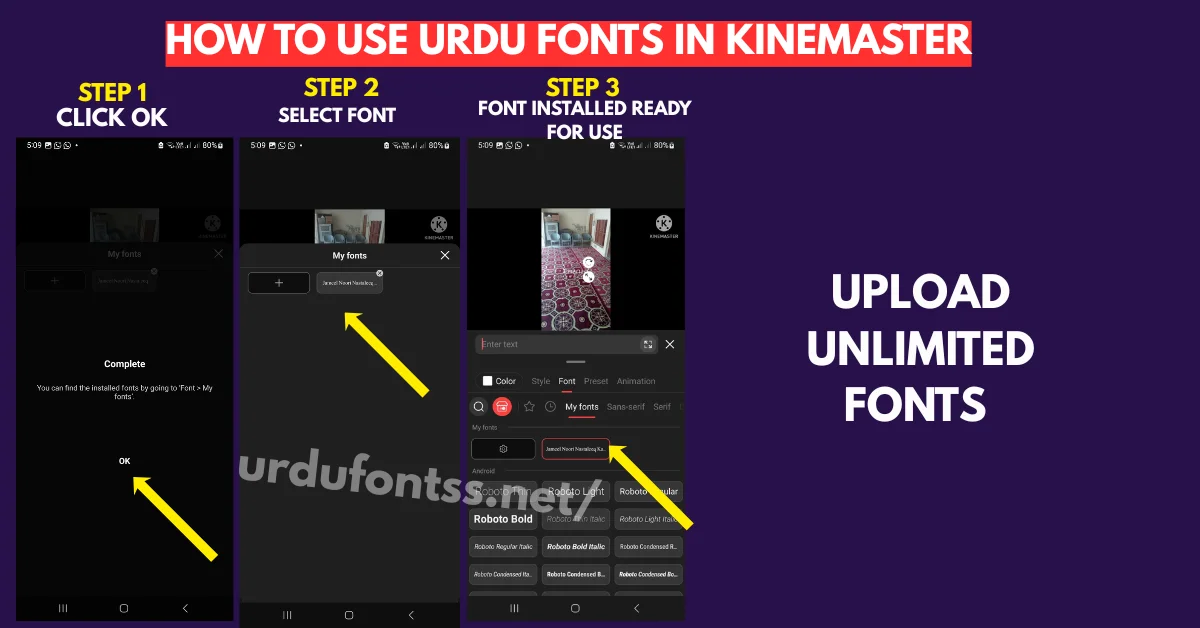
Step 6: Add Text Layer
- Kinemaster open karein
- New project create karein ya existing project open karein
- “Layer” option pe click karein
- “Text” select karein
- Text box add hoga
Step 7: Select Your Urdu Font
- Text layer pe click karein
- “Font” option pe click karein
- Aapko “Kinemaster Fonts” section mein apne installed fonts dikhenge
- Apna desired Urdu font select karein
Step 8: Type Urdu Text
- Keyboard switch karke Urdu select karein
- Apna text type karein
- Font size, color, position adjust karein
Step 9: Preview and Export
- Preview check karein
- Agar sab sahi hai to export karein
Agar Kinemaster mein problem aati hai to https://urdufontss.net/common-urdu-font-problems/ yeh article helpful hai.
Alternative Method – Using Kinemaster Built-in Font Import
Kinemaster ke naye versions mein direct font import ka feature bhi hai.
Steps:
- Kinemaster open karein
- Text layer add karein
- Font selector pe click karein
- “Add Font” ya “Import Font” option select karein
- Apni TTF file select karein
- Font automatically install ho jayega
Yeh method aasan hai lekin sab versions mein kaam nahi karta.
How to Use Urdu Fonts in Kinemaster for YouTube Videos
Doston agar aap YouTube videos bana rahe hain to yeh tips aapke liye bohat important hain.
1. Use Bold Fonts for Titles
Video title ke liye bold fonts use karein jaise https://urdufontss.net/shamsheer-unicode-shamsheer-unicode-font/ ya https://urdufontss.net/ul-noreen-bold-regular-free-urdu-font-download/
2. Use Readable Fonts for Subtitles
Subtitles aur secondary text ke liye https://urdufontss.net/urdu-naskh-unicode-regular-free-urdu-font-download/ use karein jo clear aur readable hai.
3. Font Size Recommendations
- Main title: 40-50px
- Subtitle: 30-35px
- Subtitles: 25-30px
4. Color Tips
- Text background ke saath contrast mein hona chahiye
- Dark background pe light text
- Light background pe dark text
5. Text Animation
Kinemaster mein text animations hain. Apne Urdu text ko animate kar sakte hain for better engagement.
Agar aap Canva mein bhi Urdu fonts use karte hain to https://urdufontss.net/how-to-add-urdu-fonts-in-canva/ yeh guide padhein.
How to Fix Common Kinemaster Font Problems
Problem 1: Font Not Showing in Kinemaster
Solution:
- Kinemaster app restart karein
- Check ke font TTF format mein hai
- Font folder location sahi hai? (Internal Storage > Kinemaster > Fonts)
- App ki cache clear karein
Problem 2: Font Shows But Text is Blank
Solution:
- Font file corrupt ho sakta hai. Dobara download karein
- https://urdufontss.net/ se dubara download karein
Problem 3: Urdu Font Not Working in Kinemaster
Solution:
- Ensure ke font Unicode support karta hai
- https://urdufontss.net/urdu-naskh-unicode-regular-free-urdu-font-download/ yeh font try karein
Problem 4: Font List Empty
Solution:
- “Fonts” folder ka naam exactly “Fonts” hai? (capital F)
- Kinemaster folder internal storage mein hai, SD card mein nahi
- App restart karein
Problem 5: Font Shows Boxes
Solution:
- Yeh font Unicode support nahi karta
- Koi aur Unicode font use karein
- https://urdufontss.net/jameel-noori-nastaleeq-urdu-font-download/ try karein
Agar aur problems hain to https://urdufontss.net/proper-unicode-support-urdu-font-issues/ yeh article padhein.
How to Add Urdu Text Effects in Kinemaster
Kinemaster mein aap Urdu text ko aur bhi professional bana sakte hain.
1. Text Shadow
Text shadow add karne se text pop out karta hai. Shadow opacity aur blur adjust karein.
2. Text Outline
Text ke around outline add karein. Isse text background se separate dikhta hai.
3. Text Background
Text ke peechay background box add kar sakte hain. Is se readability improve hoti hai.
4. Text Animation
Kinemaster mein text animations hain:
- Fade in/out
- Slide in/out
- Zoom in/out
- Typewriter effect
5. Text Color Gradient
Text mein gradient colors use kar sakte hain for better look.
Expert Tips for Urdu Text in Kinemaster
Tip 1: Keep Text Short
Video mein zyada text na likhein. Short aur impactful text use karein.
Tip 2: Use High Contrast Colors
Text aur background mein high contrast rakhein. Dark background pe white text best hai.
Tip 3: Test on Small Screen
Video export karne se pehle mobile screen pe test karein. Kya text readable hai?
Tip 4: Use Font Combinations
Main heading ke liye ek font, subtitle ke liye doosra font use karein.
Tip 5: Align Text Properly
Text ko center ya left align karein. Random position pe na rakhein.
Tip 6: Save Project
Project save karke rakhein. Agar future mein edit karna ho to aasani ho.
Kinemaster vs Other Video Editors for Urdu Fonts
Kinemaster vs CapCut
- Kinemaster: More professional features, multiple layers
- CapCut: Free, easier to use, but font installation similar
https://urdufontss.net/install-urdu-fonts-in-capcut/ mein CapCut guide hai.
Kinemaster vs InShot
- Kinemaster: Better for complex edits
- InShot: Simpler, good for beginners
Kinemaster vs Alight Motion
- Kinemaster: Better for video editing
- Alight Motion: Better for motion graphics and animations
Agar aap Pixellab mein bhi Urdu fonts use karte hain to https://urdufontss.net/how-to-use-urdu-fonts-in-pixellab/ yeh guide helpful hai.
Why Choose UrduFontss.Net for Urdu Fonts?
https://urdufontss.net/ aapke liye best source kyun hai?
1. 500+ Free Urdu Fonts
500 se zyada Urdu fonts available hain. AlQalam series, Sameer series, Alfars series aur bohat saare individual fonts.
2. All Fonts in TTF Format
Sab fonts TrueType Font (TTF) format mein hain. Yeh format Kinemaster aur sab devices ke saath compatible hai.
3. Safe and Virus-Free
Har font ko personally test kiya jaata hai. 100% safe downloads.
4. Detailed Installation Guides
Har font ke saath installation guide bhi hai. Windows, Mac, mobile sab ke liye step by step instructions.
5. Free Tools
- https://urdufontss.net/live-urdu-font-previews-tool/ – Font preview tool
- https://urdufontss.net/inpage-to-unicode-converter-urdu-text/ – Inpage to Unicode converter
- https://urdufontss.net/unicode-to-inpage-converter/ – Unicode to Inpage converter
- https://urdufontss.net/cute-fonts-text-generator/ – Cute fonts text generator
6. Regular Updates
Naye fonts regularly add kiye jaate hain.
7. Educational Content
Urdu fonts, typography, aur design tutorials free mein available hain. https://urdufontss.net/blog/ par mazeed content hai.
https://urdufontss.net/our-team-urdu-fonts/ par hamari team ke baare mein janein.
Final Thoughts
Doston aaj maine aapko how to use urdu fonts in kinemaster ka complete step by step guide diya.
- Kinemaster kya hai aur kyun use karte hain
- Best Urdu fonts recommendations for Kinemaster
- Urdu fonts kahan se download karein
- Step by step installation guide
- Urdu keyboard install karne ka tarika
- Common errors kaise fix karein
- YouTube videos ke liye tips
- Professional video editing tips
Key Takeaways
- Kinemaster mein Urdu fonts add karne ke liye “Fonts” folder sahi location pe banana zaroori hai
- Hamesha TTF format fonts use karein
- ZIP file extract karna mat bhoolna
- Fonts folder ka naam exactly “Fonts” (capital F) hona chahiye
- Urdu keyboard zaroor install karein warna text type nahi kar sakoge
- Agar error aaye to error fix section check karein
Ab aap ready hain apni Kinemaster videos mein professional Urdu fonts use karne ke liye. https://urdufontss.net/ se free fonts download karein aur apni creativity ko naye heights pe le jaayein.
Agar aapko koi problem aati hai to https://urdufontss.net/contact-us/ par rabta karein.
Happy Video Editing!
Frequently Asked Questions
Kinemaster mein Urdu fonts kaise lagaye?
Sabse pehle https://urdufontss.net/ se desired font download karein. ZIP file extract karein. Internal Storage > Kinemaster folder mein “Fonts” naam ka folder banayein. TTF file us folder mein paste karein. Kinemaster restart karein. Text layer mein font selector mein apna font dikh jayega.
Kinemaster fonts folder kahan hai?
Kinemaster fonts folder ka location hai: Internal Storage > Kinemaster > Fonts. Agar Kinemaster folder nahi hai to pehle Kinemaster app ek baar open karein, folder automatically ban jayega.
Kinemaster ke liye best Urdu fonts kaun se hain?
Top 10 best Urdu fonts for Kinemaster: Jameel Noori Nastaleeq, Shamsheer Unicode, SF Koonj, Urdu Naskh Unicode, Ul Noreen Bold, Zohra Unicode, Tafseer, Ul Sajid Heading, Tehreer, Ul Amjad. Yeh sab fonts https://urdufontss.net/ se free download kar sakte hain.
Kya Kinemaster mein TTF fonts kaam karte hain?
Haan, Kinemaster TTF format fonts support karta hai. Hamesha TTF fonts use karein. https://urdufontss.net/ se sab fonts TTF format mein available hain.
Kinemaster mein font add karne ke baad dikhta kyun nahi?
Do reasons ho sakte hain. Pehla: app restart nahi kiya. App force close karke restart karein. Doosra: font file corrupt hai. https://urdufontss.net/ se dobara download karein.
Kya Kinemaster mein Urdu fonts ke liye Urdu keyboard install karna zaroori hai?
Haan, bilkul zaroori hai. Agar aap Kinemaster mein Urdu text type karna chahte ho toh aapko pehle Urdu keyboard install karna hoga. https://urdufontss.net/download-and-install-urdu-keyboard-in-pc/ yeh guide follow karein.
Kinemaster mein Urdu font kaise download karein?
https://urdufontss.net/ par jaayein. Jo font chahiye uska article open karein. Download link pe click karein. Human verification complete karein. ZIP file download hojayegi. ZIP extract karein. TTF file Kinemaster Fonts folder mein paste karein
Kinemaster mein multiple fonts ek saath kaise add karein?
Sab TTF files ek saath copy karein. Internal Storage > Kinemaster > Fonts folder mein paste karein. Sab fonts automatically font selector mein show honge.
Kya Kinemaster mein Arabic fonts bhi use kar sakte hain?
Haan, Arabic fonts bhi use kar sakte hain agar font Unicode support karta hai. https://urdufontss.net/urdu-naskh-unicode-regular-free-urdu-font-download/ yeh font Arabic bhi support karta hai.
Kinemaster fonts ka backup kaise lein?
File manager open karein. Internal Storage > Kinemaster > Fonts folder mein jaayein. Saari TTF files select karein. Copy karein. Phone storage mein kisi aur folder mein paste karein ya cloud pe upload kar dein.
Disclaimer: Yeh fonts personal use ke liye provide kiye ja rahe hain. Fonts ka original copyright respective owners ke paas hai. Commercial use ke liye license check karein.
DMCA Copyright Note: All fonts mentioned in this guide are free Urdu fonts available for personal use. If you are the original creator of any font and believe your rights have been violated, please contact Jameel Noori at jameelnoori1272@gmail.com with proof of ownership. We respect intellectual property rights and will address any valid concerns promptly.




4 Comments