How to Fix Urdu Font Rendering Issues in Browsers – Complete Guide

Table of Content
Table of Contents
Introduction – fix urdu font rendering issues in browsers
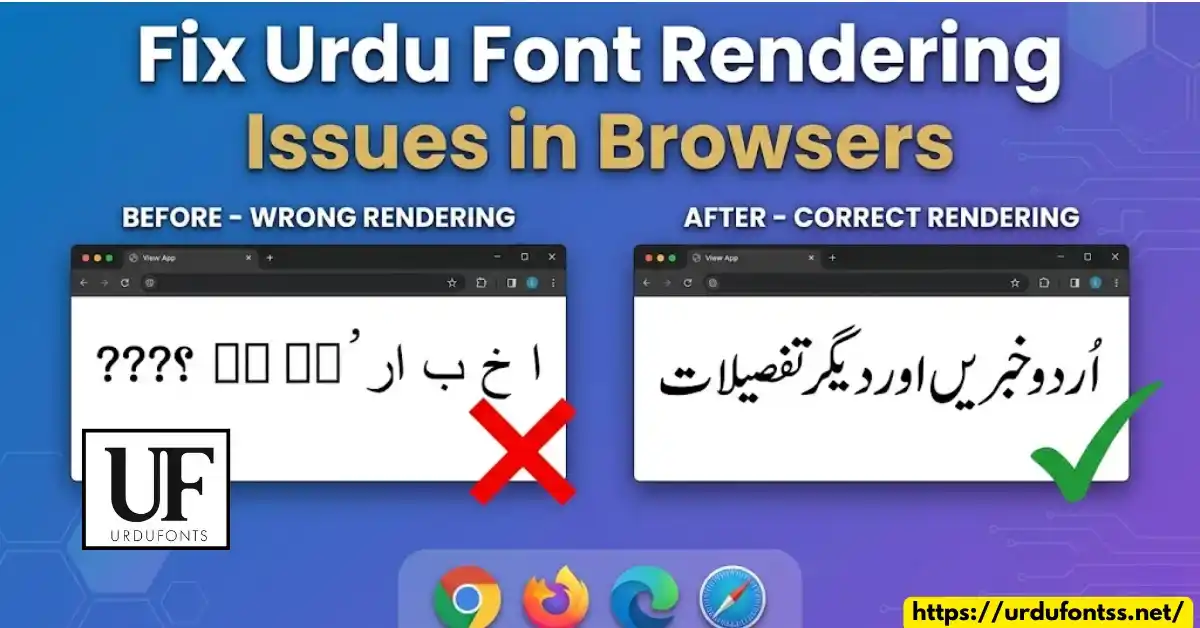
Bismillah! Kya aap kabhi browser mein Urdu website kholte hain to urdu font rendering issues face karte hain? Urdu text toot kar dikhta hai, boxes show hotay hain, ya phir text left to right chal raha hota hai?
Yeh fix urdu font rendering issues in browsers guide aapke liye hai. Is article mein main aapko batunga ke Chrome, Firefox, Edge, aur Safari mein Urdu text sahi kaise dikhayen.
Is guide mein aap seekhoge:
- Urdu font rendering issues kyun hotay hain
- Chrome mein Urdu font kaise theek karein
- Firefox, Edge, Safari ke solutions
- Website owners ke liye CSS fixes
- Best Unicode Urdu fonts for browsers
Agar aap aur Urdu fonts dekhna chahte hain to https://urdufontss.net/category/urdu-fonts/ visit karein.
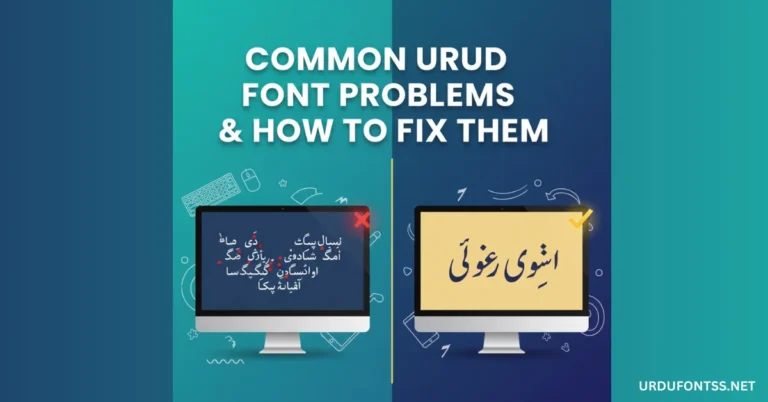
Why Do Urdu Fonts Render Incorrectly in Browsers?
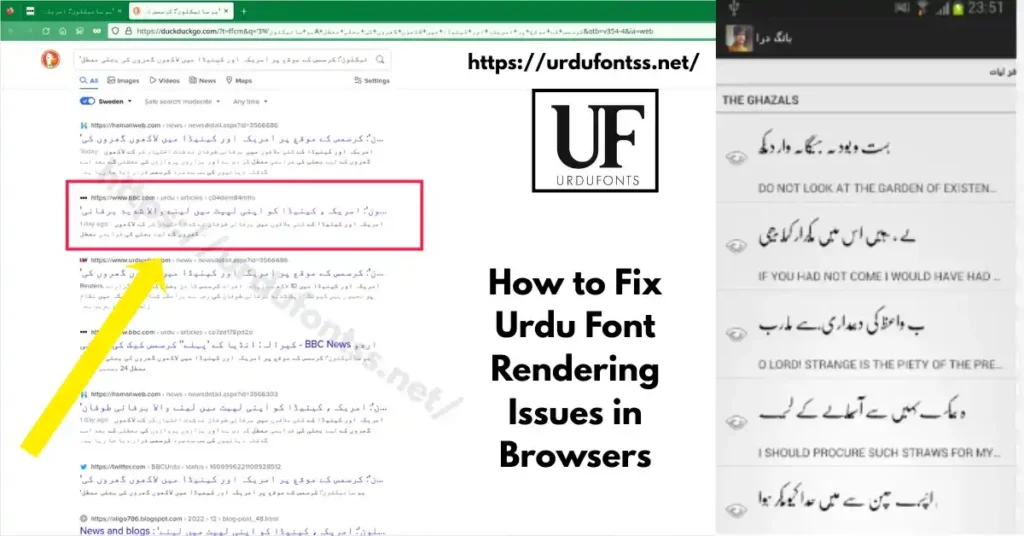
Urdu font rendering issues ke kuch main reasons hain:
| Reason | Explanation |
|---|---|
| Missing Fonts | Woh font aapke system mein install nahi hai |
| Browser Encoding | Browser sahi encoding select nahi kar raha |
| CSS Issues | Website par sahi font-family define nahi hai |
| Non-Unicode Fonts | Purane fonts browser support nahi karte |
| RTL Direction | Text right-to-left set nahi hai |
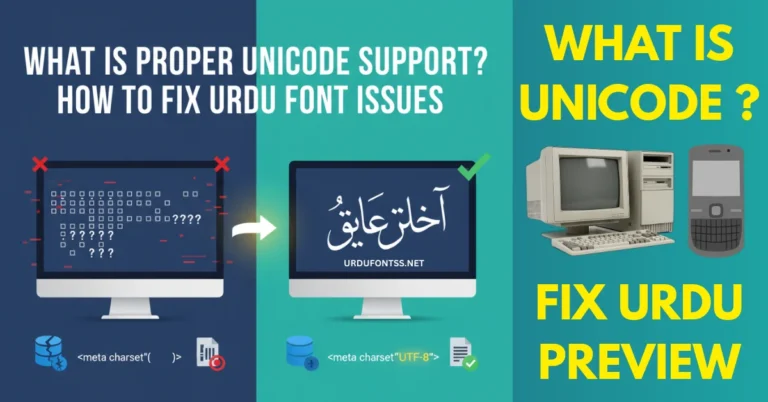
Jab urdu font rendering issues aate hain to text ya to toot kar dikhta hai, boxes show hotay hain, ya phir sahi nahi dikhta.
https://urdufontss.net/common-urdu-font-problems/ mein aur common problems ke solutions hain.
How to Fix Urdu Font Rendering in Google Chrome
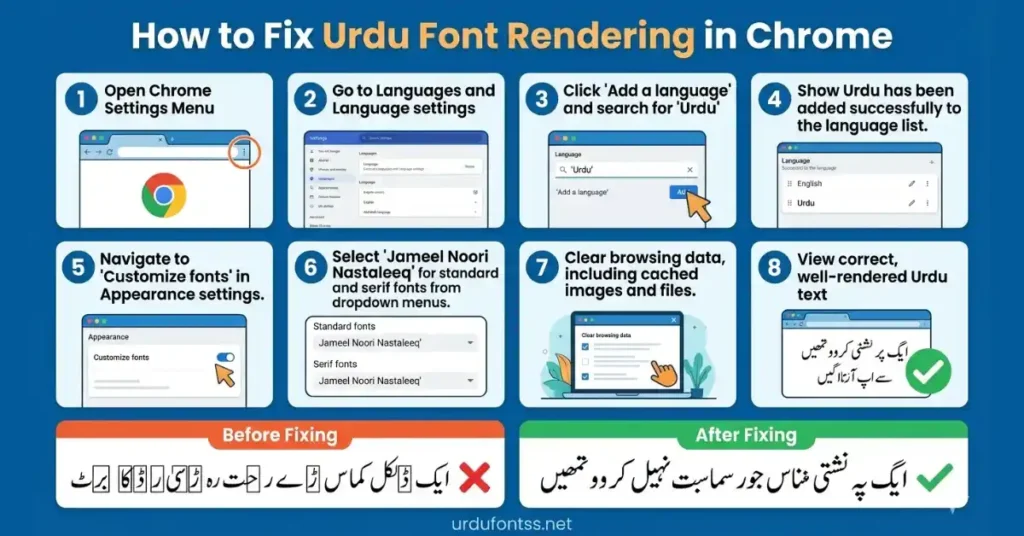
Chrome mein fix urdu font rendering issues in browsers ke liye yeh steps follow karein:
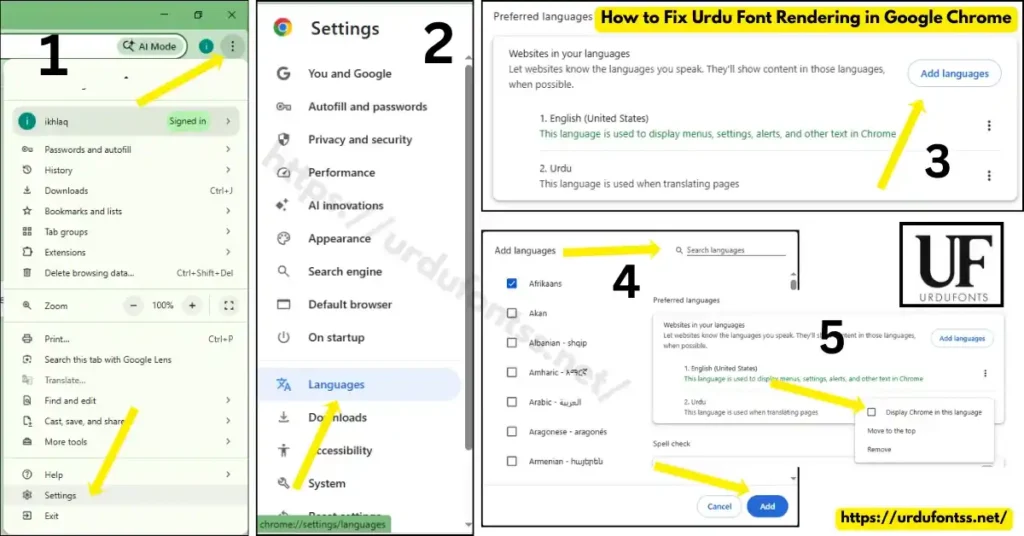
Step 1: Check Chrome Language Settings
- Chrome open karein
- Settings (three dots) pe click karein
- Languages section mein jayein
- Urdu language add karein
- Display Google Chrome in this language select karein
Step 2: Change Font Settings
- Settings > Appearance pe jayein
- Customize fonts pe click karein
- Standard font mein Jameel Noori Nastaleeq select karein
- Serif font mein Urdu Naskh Unicode select karein
Step 3: Clear Browser Cache
- Settings > Privacy and Security pe jayein
- Clear browsing data select karein
- Cached images and files select karein
- Clear data pe click karein
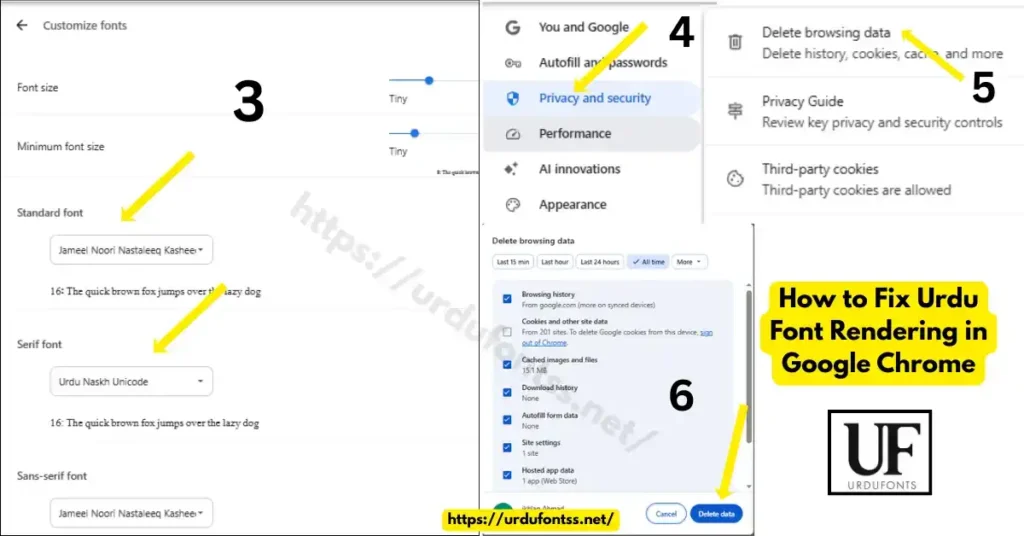
Yeh steps urdu font rendering issues ko Chrome mein fix kar dein ge.
https://urdufontss.net/jameel-noori-nastaleeq-urdu-font-download/ se Jameel Noori font download karein.
How to Fix Urdu Font Rendering in Mozilla Firefox
Firefox mein fix urdu font rendering issues in browsers ke liye:
Step 1: Install Urdu Language Pack
- Firefox open karein
- Settings (three lines) pe click karein
- Language and Appearance pe jayein
- Choose your preferred language mein Urdu add karein
- Firefox restart karein
Step 2: Change Font Settings
- Settings > Language and Appearance pe jayein
- Fonts section mein Advanced pe click karein
- Fonts for mein Urdu select karein
- Proportional mein Jameel Noori Nastaleeq select karein
Step 3: Disable Hardware Acceleration
- Settings > Performance pe jayein
- Use recommended performance settings uncheck karein
- Use hardware acceleration when available uncheck karein
- Firefox restart karein
Yeh steps urdu font rendering issues ko Firefox mein solve kar dein ge.
How to Fix Urdu Font Rendering in Microsoft Edge
Edge browser mein fix urdu font rendering issues in browsers ke liye:
Step 1: Add Urdu Language
- Edge open karein
- Settings (three dots) pe click karein
- Languages pe jayein
- Add languages mein Urdu search karein aur add karein
Step 2: Change Font Settings
- Settings > Appearance pe jayein
- Fonts section mein Customize fonts pe click karein
- Standard font mein Urdu Naskh Unicode select karein
Step 3: Enable Urdu Font Support
- Edge mein edge://flags type karein
- DirectWrite search karein
- Enabled select karein
- Edge restart karein
Yeh steps urdu font rendering issues ko Edge mein fix kar dein ge.
How to Fix Urdu Font Rendering in Safari (Mac)
Safari browser mein fix urdu font rendering issues in browsers ke liye:
Step 1: Install Urdu Fonts on Mac
- Urdu Unicode fonts download karein
- Font Book app open karein
- Fonts install karein
Step 2: Change Safari Settings
- Safari open karein
- Preferences > Advanced pe jayein
- Default encoding mein Unicode (UTF-8) select karein
- Style sheet mein None select karein
Step 3: Enable Font Smoothing
- Terminal open karein
- Yeh command run karein:bashdefaults write -g AppleFontSmoothing -int 1
- Mac restart karein
Yeh steps urdu font rendering issues ko Safari mein fix kar dein ge.
https://urdufontss.net/urdu-naskh-unicode-regular-free-urdu-font-download/ se Urdu Naskh font download karein.
CSS Fixes for Website Owners (For Developers)
Agar aap website owner hain aur urdu font rendering issues face kar rahe hain to yeh CSS fixes use karein:
Fix 1: Set Correct Font-Family
css
body {
    font-family: 'Jameel Noori Nastaleeq', 'Urdu Naskh Unicode', 'Noto Nastaliq Urdu', 'Segoe UI', sans-serif;
    font-weight: normal;
    font-style: normal;
}
Fix 2: Set Right-to-Left Direction
css
.urdu-text {
    direction: rtl;
    unicode-bidi: embed;
    text-align: right;
}
Fix 3: Use @font-face for Custom Fonts
css
@font-face{ font-display:swap;
    font-family: 'MyUrduFont';
    src: url('path/to/font.ttf') format('truetype');
    font-weight: normal;
    font-style: normal;
 }

.urdu-content {
    font-family: 'MyUrduFont', 'Jameel Noori Nastaleeq', sans-serif;
    direction: rtl;
}
Fix 4: Set Correct Character Set
html
<meta charset="UTF-8">
Fix 5: Ensure Proper HTML Lang Attribute
html
<html lang="ur" dir="rtl">
Yeh CSS fixes urdu font rendering issues ko website par solve kar dein ge.
https://urdufontss.net/proper-unicode-support-urdu-font-issues/ mein detail guide hai.
How to Install Urdu Fonts on Windows for Browsers
Windows par fix urdu font rendering issues in browsers ke liye fonts install karein:
Step 1: Download Unicode Urdu Fonts
https://urdufontss.net/ se Unicode fonts download karein
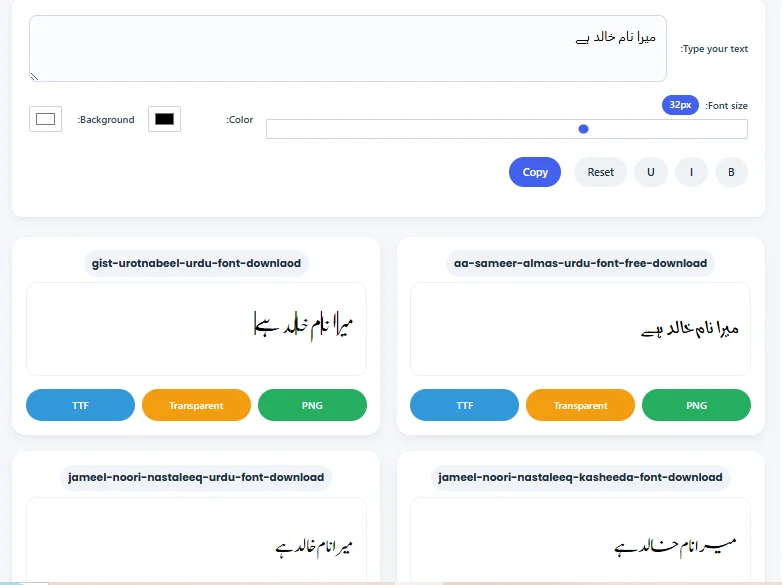
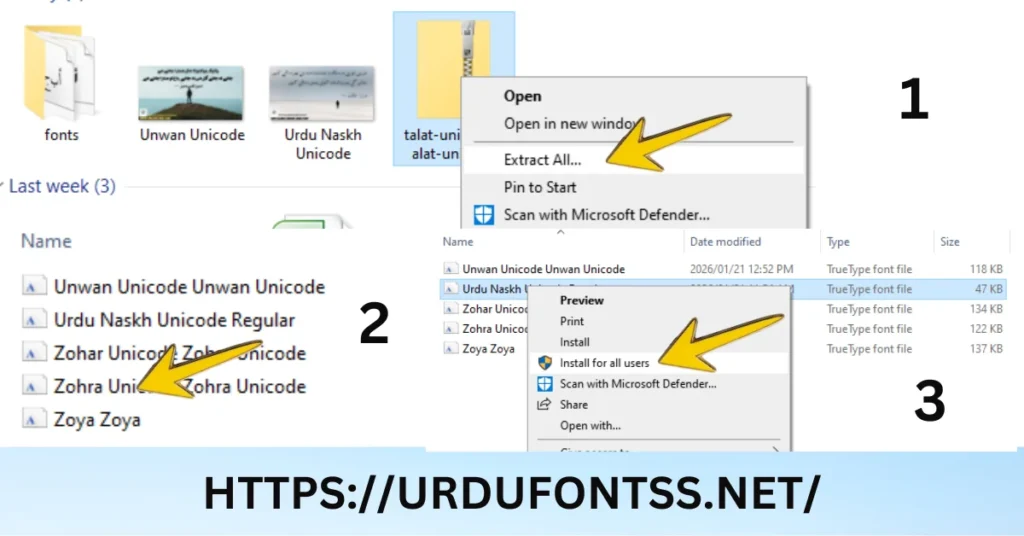
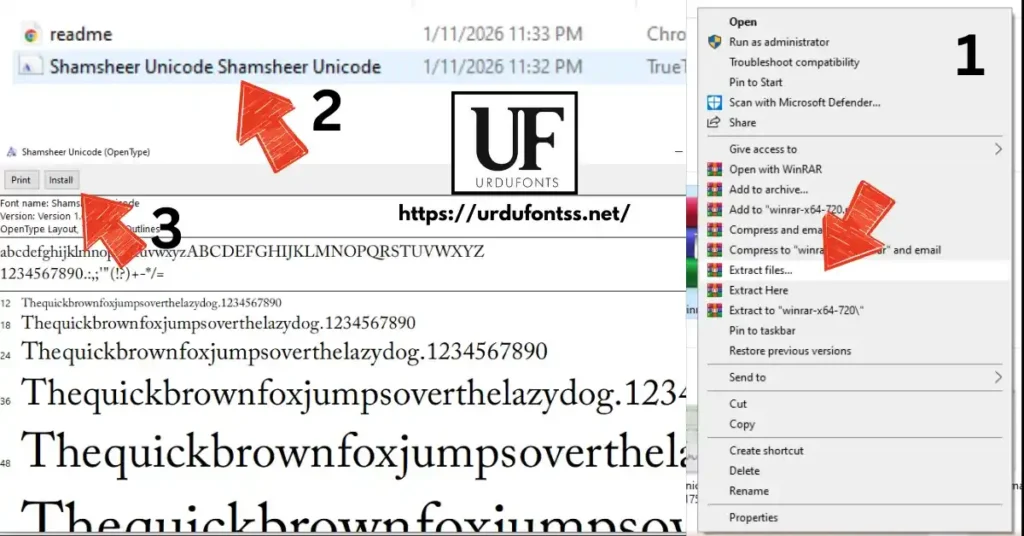
Step 2: Install Fonts
- TTF file pe double-click karein
- Install button pe click karein
- Font install ho jayega
Step 3: Restart Browser
Browser restart karein aur Urdu website check karein
Recommended Fonts for Windows
| Font Name | Download Link |
|---|---|
| Jameel Noori Nastaleeq | https://urdufontss.net/jameel-noori-nastaleeq-urdu-font-download/ |
| Urdu Naskh Unicode | https://urdufontss.net/urdu-naskh-unicode-regular-free-urdu-font-download/ |
| Shamsheer Unicode | https://urdufontss.net/shamsheer-unicode-shamsheer-unicode-font/ |
How to Install Urdu Fonts on Mac for Browsers
Mac par fix urdu font rendering issues in browsers ke liye:
Step 1: Download Fonts
https://urdufontss.net/ se TTF fonts download karein
Step 2: Install with Font Book
- TTF file pe double-click karein
- Font Book app open ho jayegi
- Install Font button pe click karein
Step 3: Restart Browser
Browser restart karein aur check karein
Best Unicode Urdu Fonts for Browsers
Urdu font rendering issues se bachne ke liye yeh Unicode fonts best hain:
| # | Font Name | Browser Support | Download |
|---|---|---|---|
| 1 | Jameel Noori Nastaleeq | All browsers | https://urdufontss.net/jameel-noori-nastaleeq-urdu-font-download/ |
| 2 | Urdu Naskh Unicode | All browsers | https://urdufontss.net/urdu-naskh-unicode-regular-free-urdu-font-download/ |
| 3 | Shamsheer Unicode | All browsers | https://urdufontss.net/shamsheer-unicode-shamsheer-unicode-font/ |
| 4 | SF Koonj Regular | All browsers | https://urdufontss.net/sf-koonj-regular-font-free-download/ |
| 5 | Zohra Unicode | All browsers | https://urdufontss.net/zohra-unicode-free-urdu-font/ |
| 6 | Ul Noreen Bold | All browsers | https://urdufontss.net/ul-noreen-bold-regular-free-urdu-font-download/ |
Yeh sab Unicode fonts hain jo urdu font rendering issues ko automatically solve kar dein ge.
https://urdufontss.net/category/all-fonts/ par mazeed fonts available hain.
How to Fix Urdu Font Rendering on Mobile Browsers
Mobile browsers mein fix urdu font rendering issues in browsers ke liye:
Android (Chrome)
- Settings > Language & Input pe jayein
- Languages > Add a language > Urdu select karein
- Chrome restart karein
iOS (Safari)
- Settings > General > Language & Region pe jayein
- Add Language > Urdu select karein
- Safari restart karein
Install Urdu Keyboard
- Gboard ya Urdu keyboard install karein
- Enable karein
- Browser mein test karein
https://urdufontss.net/download-and-install-urdu-keyboard-in-pc/ mein keyboard installation guide hai.
Common Browser Rendering Problems and Solutions
| Problem | Solution |
|---|---|
| Text showing boxes (□) | Install Unicode Urdu font on your system |
| Question marks (?) appearing | Change browser encoding to UTF-8 |
| Text broken or separated | Use proper Unicode font like Urdu Naskh |
| Left to right instead of RTL | Add direction: rtl; in CSS |
| Font not changing | Clear browser cache and restart |
| Ligatures not connecting | Use Nastaleeq font like Jameel Noori |
Agar phir bhi urdu font rendering issues hain to https://urdufontss.net/contact-us/ par rabta karein.
Other Urdu Fonts You May Like
| # | Font Name | Link |
|---|---|---|
| 1 | Tehreer Regular | https://urdufontss.net/tehreer-regular-font-download/ |
| 2 | Ul Amjad Regular | https://urdufontss.net/ul-amjad-regular-free-urdu-font-download/ |
| 3 | Tafseer Regular | https://urdufontss.net/tafseer-regular-font-free-download/ |
| 4 | Al Qalam Quran Majeed | https://urdufontss.net/al-qalam-quran-majeed-arabic-font-download/ |
| 5 | Al Mushaf | https://urdufontss.net/al-mushaf-arabic-font-download/ |
| 6 | Muhammadi Quranic Font | https://urdufontss.net/muhammadi-quranic-font-arabic-download/ |
Aur bhi Urdu fonts dekhne ke liye https://urdufontss.net/category/urdu-fonts/ visit karein.
Why Choose UrduFontss.Net for Browser Fonts?
| Feature | Benefit |
|---|---|
| 500+ Fonts | All fonts are Unicode compatible |
| TTF Format | Easy to install on Windows, Mac, Linux |
| Safe Downloads | Virus-free tested files |
| Free Tools | Font preview and converters |
| Browser Compatible | All fonts work in Chrome, Firefox, Edge, Safari |
Free Tools:
- https://urdufontss.net/live-urdu-font-previews-tool/
- https://urdufontss.net/inpage-to-unicode-converter-urdu-text/
- https://urdufontss.net/unicode-to-inpage-converter/
Final Thoughts – Fix urdu font rendering issues in browsers
Urdu font rendering issues bohat common hain lekin inka solution bohat simple hai. Bas Unicode fonts use karein aur browser settings sahi karein.
Key Takeaways:
- Hamesha Unicode fonts use karein browsers ke liye
- Browser mein Urdu language enable karein
- RTL direction set karein for Urdu text
- Clear cache regularly
- Use CSS fixes agar aap website owner hain
Fix urdu font rendering issues in browsers ke liye yeh guide follow karein. Ab aap asani se kisi bhi browser mein Urdu text sahi dekh sakte hain.
Agar koi problem ho to https://urdufontss.net/contact-us/ par rabta karein.
FAQs about Fix urdu font rendering issues in browsers
Why is Urdu text not displaying correctly in my browser?
Yeh urdu font rendering issues tab hoti hai jab aapke system mein Unicode font install nahi hai ya browser encoding sahi nahi hai. Unicode font install karein.
How to fix urdu font rendering issues in Chrome?
Chrome mein Settings > Languages > Urdu add karein, aur Customize fonts mein Jameel Noori Nastaleeq select karein.
Which Urdu fonts work best in web browsers?
Jameel Noori Nastaleeq, Urdu Naskh Unicode, aur Shamsheer Unicode best hain browsers ke liye.
How to fix broken Urdu ligatures in browsers?
Nastaleeq font use karein jaise Jameel Noori Nastaleeq. Yeh ligatures properly connect karta hai.
Why does Urdu text show left to right instead of right to left?
Browser ya website par direction: rtl; set nahi hai. CSS mein yeh property add karein.
How to add Urdu fonts to my website for proper rendering?
CSS mein @font-face rule use karein aur Unicode font define karein. Example upar diya gaya hai.
Disclaimer: Yeh fonts personal use ke liye provide kiye ja rahe hain. All fonts are Unicode compatible.
DMCA Copyright Note: If you are the original creator of any font and believe your rights have been violated, please contact us at urdufontss@gmail.com with proof of ownership.
📌 Important Note: Hamari website ka main maqsad aap ko free Urdu fonts provide karna hai. Fix urdu font rendering issues in browsers ke liye hamesha Unicode fonts use karein. Agar koi problem ho to kindly humein contact karein.


7 Comments