Mehr Nastaliq Font Free Download (Mobile Apps, Web & Desktop)

Mehr Nastaliq is a clean, modern Urdu Nastaliq webfont — a popular choice for websites, blogs and online Urdu content because it renders well in browsers and keeps the traditional Nastaliq look. You can download the verified webfont file below and use it on your website or, with the notes in this guide, on your desktop too.
Font Overview
| Feature | Details |
|---|---|
| Font Name | Mehr Nastaliq |
| Style | Nastaliq |
| Format | TTF |
| Language | Urdu |
| Works With | MS Word, InPage, Photoshop, Illustrator, PixelLab, Canva |
| Platforms | Windows, Mac, Android (in apps), iPhone/iPad (via a font installer app) |
By KG · Font file verified 24 Oct 2026: family name, format and glyph count (493) checked from the font file itself.
File verified 24 Oct 2026: Mehr Nastaliq, TTF format, linked at the top of this page. See the install sections below for how to use it on a website, on desktop and on mobile.
Table of Content
Table of Contents
What Is Mehr Nastaliq?
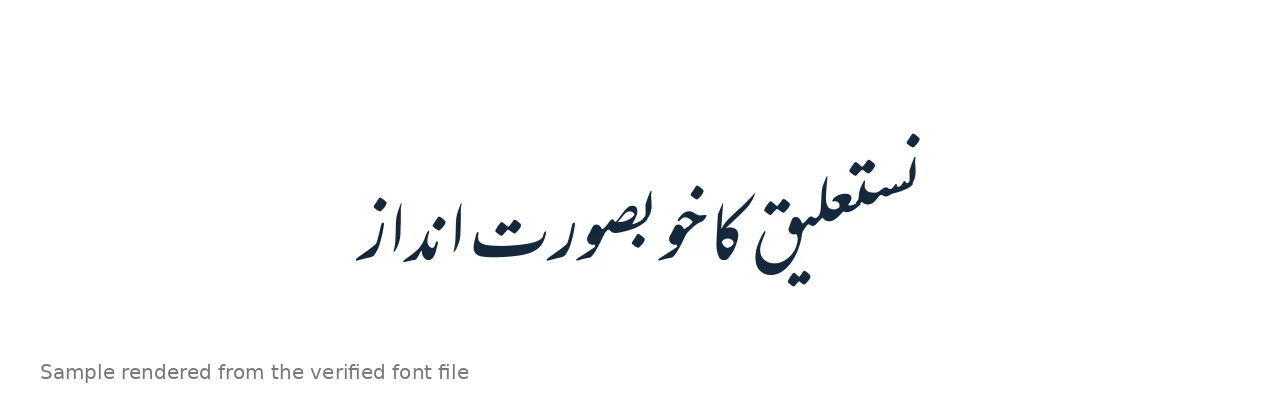
Mehr Nastaliq (distributed as “Mehr Nastaliq Web”) is a Nastaliq-style Urdu font built for the web. Nastaliq is the sloping calligraphic script used for most Urdu writing, and Mehr’s version is deliberately clean and light: it loads fast as a webfont and stays readable at article text sizes, which is why bloggers and news-style sites pick it. It is a Unicode font, so the same Urdu text that works in Word or Google Docs works with it on a website.
If you want to compare how it looks against other faces before installing, try the live Urdu font preview tool on this site, and browse the full Urdu Fonts category for more Nastaliq options.
Features of Mehr Nastaliq
- Web-first design — distributed as a TTF font that loads fast in browsers.
- Clean, readable Nastaliq — traditional slope without heavy ornamentation, good for long articles.
- Unicode-based — works with standard Urdu text in browsers, Word and Google Docs.
- Light file — the verified TTF file is small, which helps page speed on Urdu websites.
- Good for headings and body text — legible at both sizes, unlike some decorative Nastaliq faces.
How to Use Mehr Nastaliq on a Website
- Download the TTF file using the button at the top of this page.
- Upload it to your website (for example, your theme’s fonts folder).
- Add an @font-face rule in your CSS pointing to the file hosted on your own server, for example:
@font-face{ font-display:swap; font-family: 'Mehr Nastaliq'; src: url('fonts/MehrNastaliqWeb.ttf') format('truetype'); } - Apply it to Urdu text with
font-family: 'Mehr Nastaliq', serif;on your Urdu content, withdir="rtl"andlang="ur"on the Urdu blocks. - Test in Chrome and Firefox — Nastaliq shaping differs slightly between browsers, so check a real paragraph, not just a heading.
How to Use Mehr Nastaliq on Desktop (PC & Mac)
Windows and macOS font installers accept TTF and OTF files, not WOFF2 directly. If you need Mehr Nastaliq in Word or Photoshop, convert the verified WOFF2 to TTF with a font converter tool first, then install it with the standard steps in our PC install guide (Windows) or Mac install guide. After conversion, restart your app before the font appears. If you would rather skip conversion, use a desktop-ready Nastaliq instead — Jameel Noori Nastaleeq and Noto Nastaliq Urdu both ship as desktop fonts.
Best Uses for Mehr Nastaliq
- Urdu blogs and news sites — its main strength: fast, readable web Nastaliq.
- Online magazines and articles — long-form Urdu text stays legible.
- Google Docs and web documents — works as a webfont wherever custom webfonts load; see our Google Docs Urdu guide for the Docs-specific method.
- Social and poster graphics — clean enough for headings once converted or used via a web-based design tool.
- Poetry and quote pages — the Nastaliq slope suits couplets and quotes on the web.
Mehr Nastaliq vs Jameel Noori Nastaleeq
Jameel Noori Nastaleeq is the classic desktop benchmark — the font most Urdu readers recognise from print. Mehr Nastaliq is the web-first counterpart: lighter, cleaner and built to load fast in a browser. Choose Jameel Noori for print, books and desktop documents; choose Mehr when the job is a website or online article and page speed matters. For a Unicode desktop Nastaliq in the same family, Nastaliq Unicode is another verified option on this site.
Frequently Asked Questions (FAQs)
Is Mehr Nastaliq free to download?
Yes — the WOFF2 webfont file linked at the top of this page is freely available through the public npm/jsDelivr distribution, and the link was verified live.
What format is the Mehr Nastaliq download?
WOFF2 — a compressed webfont format. It is ideal for websites. Windows and macOS need TTF or OTF for desktop install, so convert it first if you want it in Word or Photoshop.
How do I add Mehr Nastaliq to my website?
Upload the WOFF2 file to your site, add an @font-face rule in your CSS pointing to it, then set font-family to Mehr Nastaliq on your Urdu content with dir=”rtl” and lang=”ur”.
Can I use Mehr Nastaliq in MS Word?
Not directly — Word needs a desktop font format. Convert the verified WOFF2 to TTF with a font converter, install the TTF, restart Word, and it will appear in the font list.
Does Mehr Nastaliq work on mobile browsers?
Yes. As a webfont it renders in mobile Chrome, Safari and Firefox the same way it does on desktop, provided the site loads it with @font-face.
Is Mehr Nastaliq better than Jameel Noori Nastaleeq?
Neither is better overall. Jameel Noori is the classic print and desktop benchmark; Mehr is lighter and built for the web. Pick based on where the text will be read.
Can I use Mehr Nastaliq for commercial websites?
We could not verify a commercial-use license statement from a primary source for this font, so check the license in the distribution you download before commercial use. For fonts with a confirmed open license, see Noto Nastaliq Urdu and Awami Nastaliq in this series.
Final Words
Mehr Nastaliq is a strong pick when your Urdu content lives on the web: clean Nastaliq shaping, a light WOFF2 file, and readable long-form text. Download the verified file above, add it with @font-face, and test a real paragraph in two browsers before you publish. For desktop documents, pair it with Jameel Noori Nastaleeq or browse the Urdu Fonts category — and see the rest of this series: Alvi Nastaleeq, Noto Nastaliq Urdu, Gulzar Nastaliq and Awami Nastaliq.