Gulzar Nastaliq Font Download — Free Urdu Font

Gulzar Nastaliq is a refined Urdu Nastaliq font from Google Fonts — popular in Pakistan for books, publications, advertisements and digital content because it pairs traditional Nastaliq elegance with clean, modern readability. It is free under the Open Font License, and you can download it from the button below, then install it on PC, mobile or your website with the steps in this guide.
File verified 24 Oct 2026: Gulzar, Open Font License, desktop TTF; the Regular file inspected for this article contains 1,161 glyphs. The same font is also available from the official Google Fonts specimen page.
Table of Content
Table of Contents
What Is Gulzar Nastaliq?
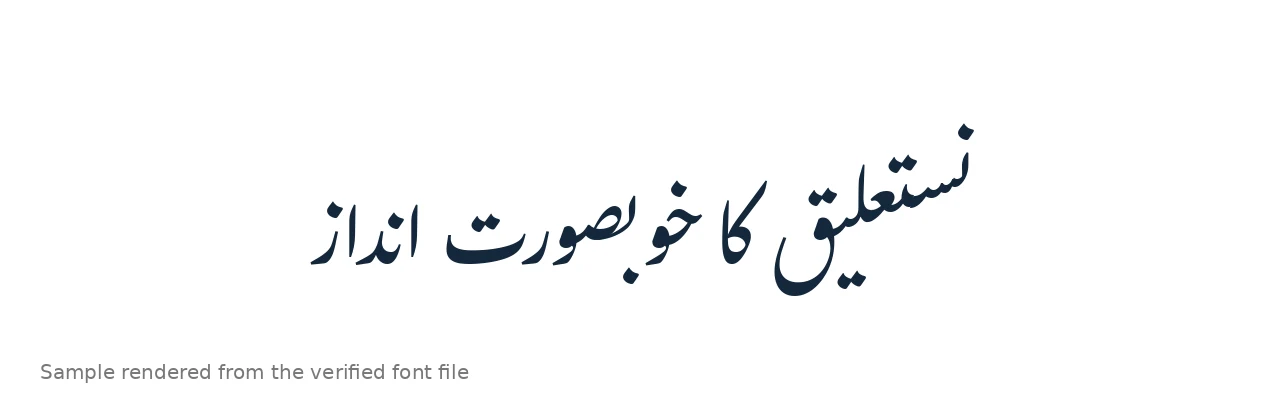
Gulzar is a Nastaliq typeface published on Google Fonts. Nastaliq is the sloping calligraphic script used for most Urdu writing, and Gulzar’s take on it is elegant without being hard to read: the letters keep the traditional curved Nastaliq feel while staying clear in longer paragraphs. That balance is why it shows up in books, formal documents and designs where the text must look both beautiful and professional. It is a Unicode font, so standard Urdu text works with it in Word, browsers and design apps, and it ships with a matching Latin typeface, which helps when a document mixes Urdu with English words.
To compare it with other faces before installing, try the live Urdu font preview tool and browse the Urdu Fonts category on this site.
Features of Gulzar Nastaliq
- Official Google Fonts source — safe download, clear Open Font License.
- Elegant, readable Nastaliq — traditional curves that stay legible in long paragraphs.
- Matching Latin typeface — useful for bilingual Urdu + English documents.
- Unicode-based — standard Urdu text works in Word, browsers and design apps.
- Good for print and screen — suits books, formal documents, logos and social designs.
How to Install on PC (Windows & Mac)
- Download using the button at the top of this page, then unzip the downloaded file.
- Windows: Right-click the TTF file and choose Install, or drag it into Settings → Personalization → Fonts. Full steps: PC install guide.
- macOS: Double-click the TTF file and click Install Font in Font Book.
- Restart your app if Word or Photoshop was already open.
- Select “Gulzar” in the font list and type with an Urdu keyboard layout enabled.
How to Use on Mobile (Android & iPhone)
On Android, install the TTF through a font installer app or use it inside design apps that support custom font upload (PixelLab, Canva). On iPhone, iOS does not allow a system-wide custom font, but apps that support font import can use the TTF, and web pages using Gulzar through Google Fonts render it automatically in mobile browsers.
How to Use on a Website
Add Gulzar from Google Fonts to your page and set font-family: 'Gulzar', serif; on your Urdu content with dir="rtl" and lang="ur". Because Google serves it subsetted by unicode-range, visitors who never view Urdu text do not download the font — a page-speed advantage for mixed-language sites.
Best Uses for Gulzar Nastaliq
- Books and publishing — a first-class pick for Urdu books; see our book publishing font guide.
- Formal documents and reports — elegant without sacrificing readability.
- Islamic and calligraphic designs — suits quotes and headings; see the Islamic and calligraphy fonts guide.
- Logos and branding — distinctive Nastaliq with a matching Latin face for bilingual marks.
- Social posts and posters — clean at display sizes for quotes and announcements.
Gulzar Nastaliq vs Jameel Noori Nastaleeq
Jameel Noori Nastaleeq is the classic, compact benchmark most Urdu readers recognise from print. Gulzar is more refined and spacious — a touch more “designed” — which suits books, formal documents and branding where elegance matters more than tradition. For everyday documents and maximum familiarity, Jameel Noori wins; for publishing and design-led work, Gulzar is a strong alternative. If you need a clean Naskh face instead, Urdu Naskh Unicode is the verified Naskh option on this site, and the top 10 Urdu fonts for designers compares more faces.
Frequently Asked Questions (FAQs)
Is Gulzar Nastaliq free?
Yes. It is published on Google Fonts under the Open Font License, free for personal and commercial use under the OFL terms.
Where is the official download for Gulzar Nastaliq?
The font is published on Google Fonts under the Open Font License. The download button at the top of this article serves the verified TTF file, and the official Google Fonts specimen page also carries Google’s own Download button.
Does Gulzar Nastaliq work in MS Word?
Yes. Install the TTF on Windows or macOS, restart Word, select “Gulzar” and type with an Urdu keyboard layout enabled.
Can I use Gulzar Nastaliq on my website?
Yes. Add it from Google Fonts and set it as the font-family for your Urdu content with dir=”rtl” and lang=”ur”.
Is Gulzar Nastaliq good for books?
Yes — it is one of the better Google Fonts choices for Urdu books: elegant Nastaliq forms that stay readable across long chapters.
Does Gulzar support English text too?
Yes — Gulzar ships with a matching Latin typeface, which makes it practical for bilingual documents that mix Urdu with English words.
Can I use Gulzar Nastaliq commercially?
Yes, under the Open Font License: you may use it in commercial projects, including websites and printed work, following the OFL terms (you may not sell the font itself).
Final Words
Gulzar Nastaliq is a refined, trustworthy Nastaliq for books, formal documents and design-led Urdu work — with an official Google Fonts source and a clear open license. Download it using the button above and follow the install steps for your device. For more faces, browse the Urdu Fonts category — including Jameel Noori Nastaleeq and the rest of this series: Alvi Nastaleeq, Mehr Nastaliq, Noto Nastaliq Urdu and Awami Nastaliq.