Noto Nastaliq Urdu Font Free Download & Install Guide

Noto Nastaliq Urdu is Google’s free Nastaliq font for the Urdu language — part of the Noto family, released under the Open Font License, and one of the most reliable Nastaliq faces you can install today. It works on PC, mobile and websites, and because it comes from Google Fonts, the download is safe and the license is clear. Download it from the official page below, then follow the install steps for your device.
File verified 24 Oct 2026: Noto Nastaliq Urdu, Open Font License, desktop TTF (variable font, weight axis); the Regular weight inspected for this article contains 1,723 glyphs. The same font is also available from the official Google Fonts specimen page.
Table of Content
Table of Contents
What Is Noto Nastaliq Urdu?
Noto Nastaliq Urdu is Google’s Nastaliq typeface for Urdu, built as part of the Noto project whose goal is a font for every language. Nastaliq is the sloping, calligraphic script used for most Urdu writing, and Noto’s version is designed for correct, modern rendering: proper joining, ligatures and diacritics across browsers, Word, Google Docs and design apps. Because it is a Unicode font under the Open Font License, you can use it freely in personal and commercial projects, including websites and printed work, under the OFL terms.
If you are new to Urdu fonts generally, the Urdu Fonts category collects every face on this site, and the live Urdu font preview tool lets you compare Nastaliq faces before you install.
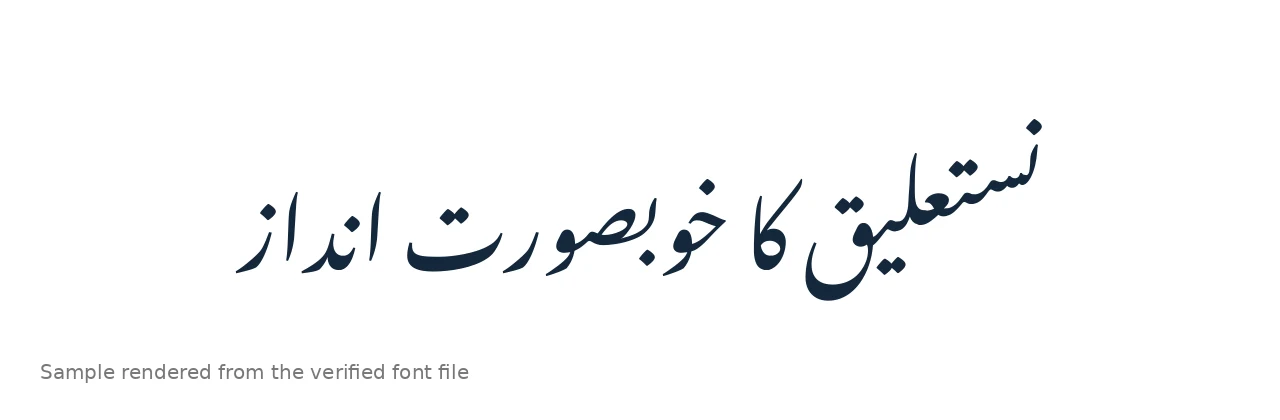
Features of Noto Nastaliq Urdu
- Official Google Fonts source — safe download, clear Open Font License, no bundled installers.
- Variable weight font — the desktop file carries a weight axis, so Regular and Bold come from one family.
- Full Urdu coverage — the Regular weight inspected for this article contains 1,723 glyphs, covering Urdu letters, ligatures and marks.
- Correct Nastaliq shaping — joining and ligature behaviour designed for modern renderers in browsers and apps.
- Works everywhere — Windows, macOS, Android, iOS apps that accept custom fonts, and websites via Google Fonts.
How to Install on PC (Windows & Mac)
- Download using the button at the top of this page, then unzip the downloaded file.
- Windows: Right-click the TTF file and choose Install, or drag it into Settings → Personalization → Fonts. Full steps: PC install guide.
- macOS: Double-click the TTF file and click Install Font in Font Book.
- Restart your app (Word, Photoshop, etc.) if it was already open.
- Select “Noto Nastaliq Urdu” in the font list and type with an Urdu keyboard layout enabled.
How to Use on Mobile (Android & iPhone)
On Android, Noto Nastaliq Urdu is already the font many apps and websites fall back to for Urdu text, because Google ships it with the system. To use it in a design app, install the TTF through a font installer app or use an app with its own font upload (PixelLab, Canva). On iPhone, iOS does not allow a system-wide custom font, but apps that support font import can use the TTF, and Google Docs on mobile renders Noto Nastaliq Urdu automatically for Urdu text — see our Google Docs Urdu guide.
How to Use on a Website
The easiest web route is Google Fonts itself: add the Noto Nastaliq Urdu stylesheet to your page and set font-family: 'Noto Nastaliq Urdu', serif; on your Urdu content with dir="rtl" and lang="ur". Google serves it subsetted by unicode-range, so visitors who never view Urdu text do not download the font at all — a real page-speed advantage over self-hosting a large Nastaliq file.
Best Uses for Noto Nastaliq Urdu
- Websites and blogs — the natural choice for Urdu web text via Google Fonts.
- Google Docs and documents — renders correctly without any install on the reader’s side.
- Books and publishing — a clean, correct Nastaliq for long-form work; see our book publishing font guide.
- Canva and design apps — upload the TTF where the app supports custom fonts; see adding Urdu fonts in Canva.
- Social and poster graphics — legible Nastaliq for quotes, announcements and thumbnails.
Noto Nastaliq Urdu vs Jameel Noori Nastaleeq
Jameel Noori Nastaleeq is the classic Pakistani Nastaliq — compact, traditional, and the face most Urdu readers recognise from print. Noto Nastaliq Urdu is slightly more open and engineered for screens: better default rendering in browsers and Docs, a clear open license, and a single trusted source. For print and traditional layouts, Jameel Noori remains the benchmark; for websites, Docs and apps, Noto is usually the safer, simpler pick. If a font ever fails to display, our common Urdu font problems guide covers the usual fixes.
Frequently Asked Questions (FAQs)
Is Noto Nastaliq Urdu free?
Yes. It is published by Google under the Open Font License, free for personal and commercial use under the OFL terms, and downloadable from Google Fonts.
Where is the official download for Noto Nastaliq Urdu?
The font is published on Google Fonts under the Open Font License. The download button at the top of this article serves the verified TTF file, and the official Google Fonts specimen page also carries Google’s own Download button.
Does Noto Nastaliq Urdu work in MS Word?
Yes. Install the TTF on Windows or macOS, restart Word, select “Noto Nastaliq Urdu” and type with an Urdu keyboard layout enabled.
Does Noto Nastaliq Urdu work in Google Docs?
Yes — Google Docs renders Urdu text in Noto Nastaliq Urdu automatically, and you can also select it from the font list. See our Google Docs Urdu guide for the full method.
Can I use Noto Nastaliq Urdu on my website?
Yes. Add it from Google Fonts and set it as the font-family for your Urdu content with dir=”rtl” and lang=”ur”. Google serves it subsetted, so it does not slow down pages without Urdu text.
Is Noto Nastaliq Urdu available in Bold?
The desktop file is a variable font with a weight axis, so Bold is available from the same family — in most apps it appears when you apply Bold to the Regular weight.
Can I use Noto Nastaliq Urdu commercially?
Yes, under the Open Font License: you may use it in commercial projects, including websites and printed work, following the OFL terms (you may not sell the font itself).
Final Words
Noto Nastaliq Urdu is the safest first Nastaliq to install: official Google source, open license, correct shaping, and it works on PC, mobile and the web without drama. Download it from the official page above and follow the install steps for your device. For more faces, browse the Urdu Fonts category — including Jameel Noori Nastaleeq and the rest of this series: Alvi Nastaleeq, Mehr Nastaliq, Gulzar Nastaliq and Awami Nastaliq.


One Comment