Trad Arabic Bold Unicode Free Urdu Font Download

Trad Arabic Bold Unicode is a bold, traditional Arabic-style Urdu font built for text that has to be read at a glance — headings, banners, announcements and titles. Its heavy strokes keep Arabic and Urdu lettering strong and legible where a regular-weight font would fade into the page. Download the TTF file free below and install it on Windows, Mac or Android.
Table of Content
Table of Contents
Trad Arabic Bold Unicode Free Download
| Feature | Details |
|---|---|
| Font Name | Trad Arabic Bold Unicode |
| Style | Bold — traditional Arabic (Naskh-style) lettering |
| Format | TTF (delivered in a ZIP of about 67 KB) |
| Unicode | Yes — text stays searchable and renders consistently across devices |
| Works With | MS Word, InPage, Photoshop, Illustrator, Canva and all TTF-supported software |
| Platforms | Windows, Mac, Android (in apps) |
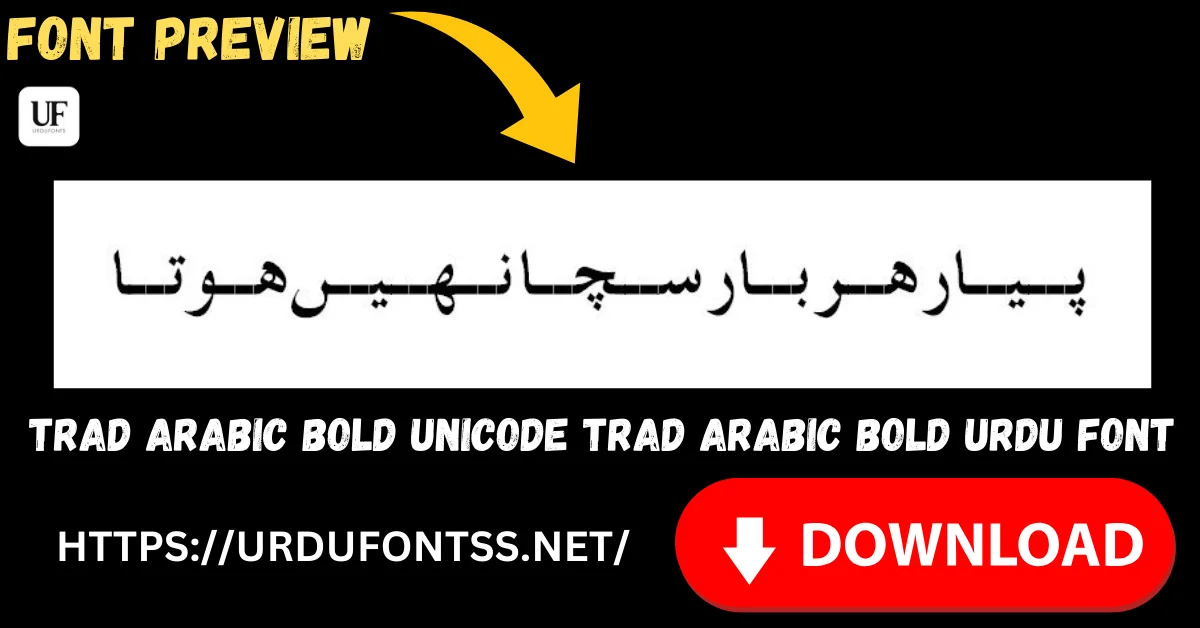
Before you download, you can also preview Trad Arabic Bold with your own heading in our Live Urdu Font Previews tool — type the exact title or announcement line you plan to print and check its weight at your real size.
Font Preview
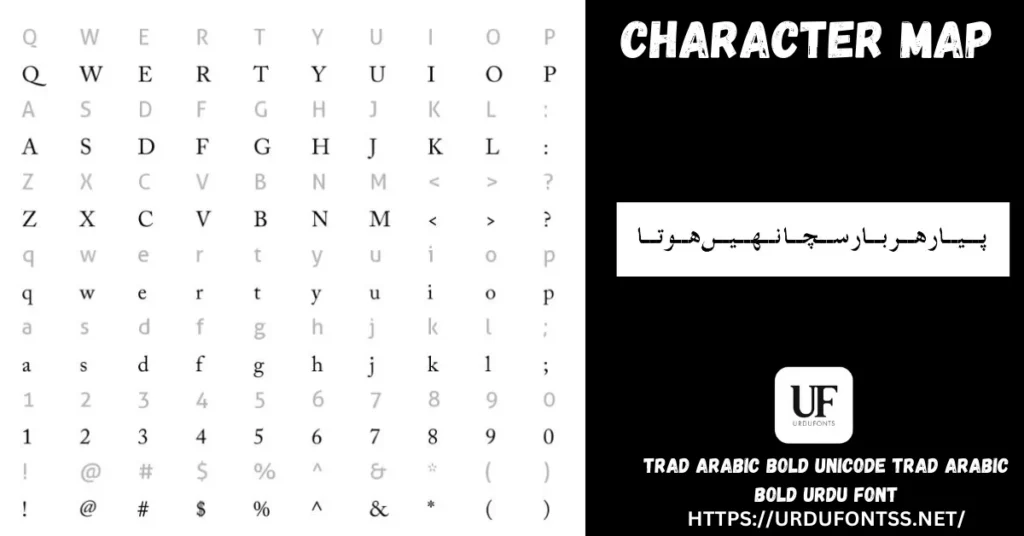
The character map above shows the font’s letters, figures and symbols. Note the sample line: even at map size, the strokes stay heavy and open — that weight is the whole point of this font.
What Makes Trad Arabic Bold Unicode Different
- A true bold, not a fake one: the weight is drawn into the letterforms themselves. Clicking “Bold” on a regular Arabic font in Word only smears the strokes; this font’s headings come out clean, even and properly shaped.
- Readable from a distance: thick strokes and open counters survive the situations regular Arabic fonts fail — a banner across a hall, a poster on a wall, a thumbnail shrunk on a phone screen.
- Traditional Arabic character: the lettering keeps the classic Naskh-style proportions readers expect from printed Arabic, so formal and religious headings look right, not modernised.
- Unicode behaviour: despite the traditional look, the text is fully Unicode — it copies, searches and prints consistently instead of breaking like legacy bold Arabic files.
- Know its limit: bold is for emphasis. Set a whole page in it and the text turns tiring and heavy — pair it with a regular-weight text font for the paragraphs, as the comparison below shows.
Best Uses for Trad Arabic Bold Unicode
- Headings and titles — book covers, chapter headings and document titles in Arabic or Urdu.
- Banners and announcements — mosque notices, event banners and public announcements that must read from several steps away.
- Religious headings — the heading above Quranic or Hadith text, where the verses themselves sit in a dedicated Quranic font.
- Posters and thumbnails — bold lines that stay legible when a design is viewed small.
- Certificates and name boards — names and award lines with formal weight.
This font sits on the Arabic shelf of the site: our Islamic and calligraphy fonts guide recommends it for exactly these jobs — titles, banners and announcements — alongside the Quranic text fonts it pairs with.
How to Download and Install
On Windows
Click the download button at the top of this page, extract the ZIP, right-click the TTF file and choose Install. Restart your app and Trad Arabic Bold appears in its font list. The full walkthrough is in our PC install guide for Urdu fonts.
On Mac
Extract the ZIP, double-click the TTF and choose Install Font in Font Book.
On Android
Modern Android phones do not allow free system-wide font changes, so use the TTF inside apps such as PixelLab, CapCut or Canva — our Android install guide shows the in-app method step by step.
Trad Arabic Bold Unicode vs Similar Fonts
| Font | How It Differs |
|---|---|
| Al Mushaf | A Quranic text font in a regular weight, built for reading the verses themselves — use Al Mushaf for the text and Trad Arabic Bold for the heading above it. |
| Scheherazade | A regular-weight Naskh for Arabic prose and academic work — the body-text partner to this font’s bold headings. |
| Sulus Unicode | Decorative Thuluth calligraphy for artwork and ceremonial headings; Trad Arabic Bold is plainer and stronger where the message matters more than the flourish. |
More Arabic styles are collected in the Arabic fonts category, and the Quranic fonts are compared in the Islamic and calligraphy fonts guide.
Troubleshooting
| Problem | Solution |
|---|---|
| Font not showing in software | Restart the application after installation |
| Heading looks heavy or cramped at small sizes | Bold Arabic needs size — increase the font size, or switch small lines to a regular-weight font |
| Letters not joining properly | Enable RTL (right-to-left) text settings in your app |
| Boxes instead of Arabic text | Install the Arabic/Urdu language support or check your Unicode settings |
For the full fix list, see our common Urdu font problems and fixes guide.
Licence Information
| Usage Type | Licence Status |
|---|---|
| Personal Use | ✅ Free to download |
| Commercial Use | Check the font’s licence terms before using it in commercial work |
Trad Arabic Bold Unicode is free to download from this page. All rights to the font belong to its respective owner; we do not claim ownership, and this page is provided for preview and informational purposes. If you are the copyright owner and believe any information here needs correction, contact us at urdufontss@gmail.com and we will act on it promptly.
Final Words
Every Arabic font collection needs one dependable bold — for the heading, the banner and the announcement that cannot afford to be missed. Trad Arabic Bold Unicode is that font: genuinely heavy, traditionally shaped, and honest Unicode underneath. Download it, set your heading, and pair it with a calm regular-weight font for everything underneath.
Frequently Asked Questions (FAQs)
Is Trad Arabic Bold Unicode free to download?
Yes. The TTF is free to download from the button at the top of this page, in a ZIP of about 67 KB. For commercial projects, check the font’s licence terms first.
Is this a real bold font, or do I bold it in Word?
It is a real bold font — the weight is part of the letterforms, so headings render cleanly. Applying Word’s Bold button to a regular Arabic font only thickens strokes unevenly; this font needs no such trick.
Can I use Trad Arabic Bold for Quran text?
Use it for the heading, not the verses. Quranic passages belong in a dedicated Quranic font such as Al Mushaf or Al Qalam Quran Majeed, which carry the letterforms and marks the text needs; this bold font is for titles above them.
What is Trad Arabic Bold best used for?
Headings, banners, announcements, posters and certificates — anywhere Arabic or Urdu text must stay strong and readable at a distance or at a glance.
How do I install Trad Arabic Bold on Windows?
Download and extract the ZIP, right-click the TTF file, and choose Install. Restart your app and the font appears in its font list, ready in Word, InPage and Photoshop.
Does Trad Arabic Bold work on Android?
Yes, inside apps. Modern Android does not allow free system-wide font changes, so load the TTF in an app such as PixelLab, CapCut or Canva and select it there for your banner or poster text.
Can I preview Trad Arabic Bold with my own text before downloading?
Yes — open the Live Urdu Font Previews tool on urdufontss.net, type your own heading, and check its weight and spacing before you install anything.