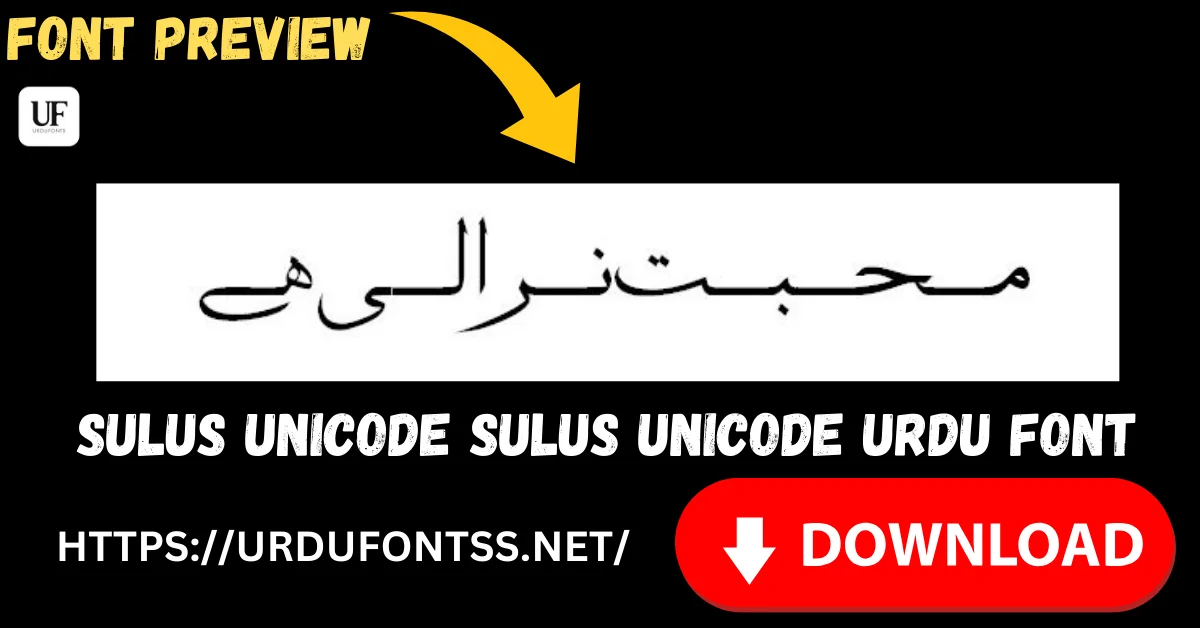
Sulus Unicode Free Urdu Font Download (TTF)

Sulus is a Thuluth-style calligraphy font with full Unicode support — tall, interwoven strokes in the tradition of mosque artwork and classical Islamic headings, in a file that installs and renders like a modern text font. Download the TTF free below and install it on Windows, Mac or Android.
Table of Content
Table of Contents
Sulus Unicode Free Download
| Feature | Details |
|---|---|
| Font Name | Sulus Unicode |
| Style | Sulus (Thuluth-style calligraphy) |
| Format | TTF (delivered in a ZIP of about 68 KB) |
| Unicode | Yes — text stays searchable and renders consistently across devices |
| Embedding | Installable |
| Works With | MS Word, InPage, Photoshop, Illustrator, Canva and all TTF-supported software |
| Platforms | Windows, Mac, Android (in apps) |
Before you download, you can also preview Sulus with your own text in our Live Urdu Font Previews tool — calligraphy fonts in particular can look very different with your words than with a sample line.
Font Preview
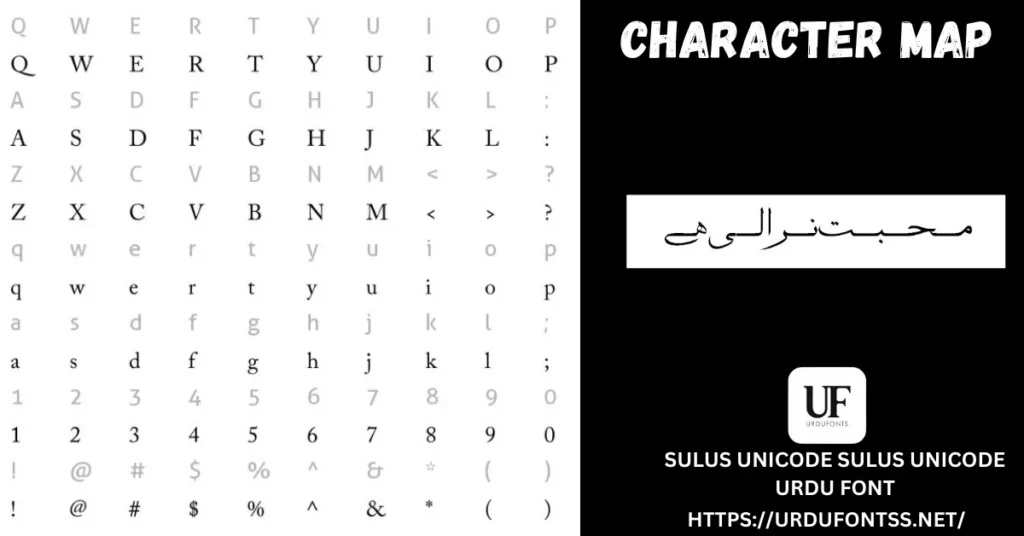
The character map above shows the font’s Latin and symbol set alongside its Urdu sample line. For a full verse or heading in Sulus, type it into the Live Previews tool linked in the download section — that is the truest test of any calligraphy font.
What Makes Sulus Unicode Different
- True Thuluth character: Sulus (from Arabic thuluth, “one third” — named for the pen angle) is the monumental calligraphy style of mosque domes and Quran headings; this font brings that tall, interwoven look to a regular TTF file.
- Decorative without going unreadable: the structure stays clean underneath the flourishes, so headings and short passages remain legible — many decorative fonts sacrifice exactly that.
- Full Unicode behaviour: text copies, searches and renders consistently across Windows, Mac and phones, with none of the broken-letter problems of legacy non-Unicode calligraphy files.
- Balanced curves, consistent spacing: the letterforms keep an even rhythm, which is what makes a Sulus heading look polished rather than cluttered.
- Light file for a display font: about 68 KB — quick to download and no burden on documents or design files.
Best Uses for Sulus Unicode
- Islamic headings and titles — book covers, chapter headings and event titles that need a sacred, classical tone.
- Mosque and madrasa artwork — banners, posters and printed announcements in the Thuluth tradition.
- Religious publications — Duas, Islamic articles and learning materials where the traditional style adds authenticity.
- Posters and social media designs — a verse or short quote set large, with body text in a plainer font beneath.
- Certificates and invitations — formal Urdu and Arabic lines that should look ceremonial.
Sulus is a display style: keep it for headings and short lines. For the paragraphs underneath, pair it with a readable text font — the pairings in the comparison below and in our Islamic and calligraphy fonts guide cover the combinations that work.
How to Download and Install
On Windows
Click the download button at the top of this page, extract the ZIP, right-click the TTF file and choose Install. Restart your app and Sulus appears in its font list. The full walkthrough is in our PC install guide for Urdu fonts.
On Mac
Extract the ZIP, double-click the TTF and choose Install Font in Font Book.
On Android
Modern Android phones do not allow free system-wide font changes, so use the TTF inside apps such as PixelLab, CapCut or Canva — our Android install guide shows the in-app method step by step.
Sulus Unicode vs Similar Fonts
| Font | How It Differs |
|---|---|
| Sharmeen | An elegant, flowing Urdu style for creative projects and invitations — softer and more modern; Sulus is the classical, monumental calligraphy choice. |
| Al Qalam Quran Majeed | A Quranic text font built for reading verses with full marks — use it for the text itself, and Sulus for the heading above it. |
| Jameel Noori Nastaleeq | The classic publishing Nastaliq for long Urdu text — the body-text partner to a Sulus heading, not a competitor to it. |
More calligraphy and Quranic options are compared in the Islamic and calligraphy fonts guide, and the full shelf is in the Urdu fonts collection.
Troubleshooting
| Problem | Solution |
|---|---|
| Font not showing in software | Restart the application after installation |
| Heading looks cramped or clipped | Increase the font size and line height — Thuluth strokes are tall and need vertical room |
| Letters not joining properly | Enable RTL (right-to-left) text settings in your app |
| Boxes instead of Urdu text | Install the Urdu language pack or check your Unicode support settings |
For the full fix list, see our common Urdu font problems and fixes guide.
Licence Information
| Usage Type | Licence Status |
|---|---|
| Personal Use | ✅ Free to download |
| Commercial Use | Check the font’s licence terms before using it in commercial work |
Sulus Unicode is free to download from this page. All rights to the font belong to its respective owner; we do not claim ownership, and this page is provided for preview and informational purposes. If you are the copyright owner and believe any information here needs correction, contact us at urdufontss@gmail.com and we will act on it promptly.
Final Words
When a heading has to carry the weight of a mosque banner, a book cover or a religious poster, Sulus gives it the classical Thuluth presence that plain fonts cannot — while its Unicode build keeps the file as easy to install and use as any modern font. Preview your heading, download it, and pair it with a readable text font underneath.
Frequently Asked Questions (FAQs)
What type of font is Sulus Unicode?
A TrueType font in the Sulus (Thuluth) calligraphy style, with full Unicode support. It is designed for headings, artwork and short passages rather than long body text.
Is Sulus Unicode free to download?
Yes. The TTF is free to download from the button at the top of this page, in a ZIP of about 68 KB — no verification step or sign-up is needed. For commercial projects, check the font’s licence terms first.
Is Sulus Unicode installable on my system?
Yes — its embedding is installable. Install the TTF on Windows or Mac and it appears in Word, InPage, Photoshop and other apps; on Android, load it inside apps such as PixelLab or CapCut.
What is Sulus Unicode best used for?
Islamic headings, mosque and madrasa artwork, religious posters, book covers and certificates — anywhere a classical Thuluth look is needed at a large size.
Can I use Sulus Unicode for long Urdu text?
It stays readable in short passages, but it is a display style. For long text, set the body in a reading font such as Jameel Noori Nastaleeq and keep Sulus for the headings.
Does Sulus Unicode include a character map?
Yes — the character map on this page shows the font’s letters and symbols. You can also type your own verse or heading into the Live Urdu Font Previews tool to see it rendered live.
How is Sulus different from other calligraphy fonts on this site?
Sulus follows the tall, interwoven Thuluth tradition used in mosque artwork. Softer options such as Sharmeen suit invitations and creative posts; Quranic text fonts such as Al Qalam Quran Majeed are for the verses themselves.

One Comment