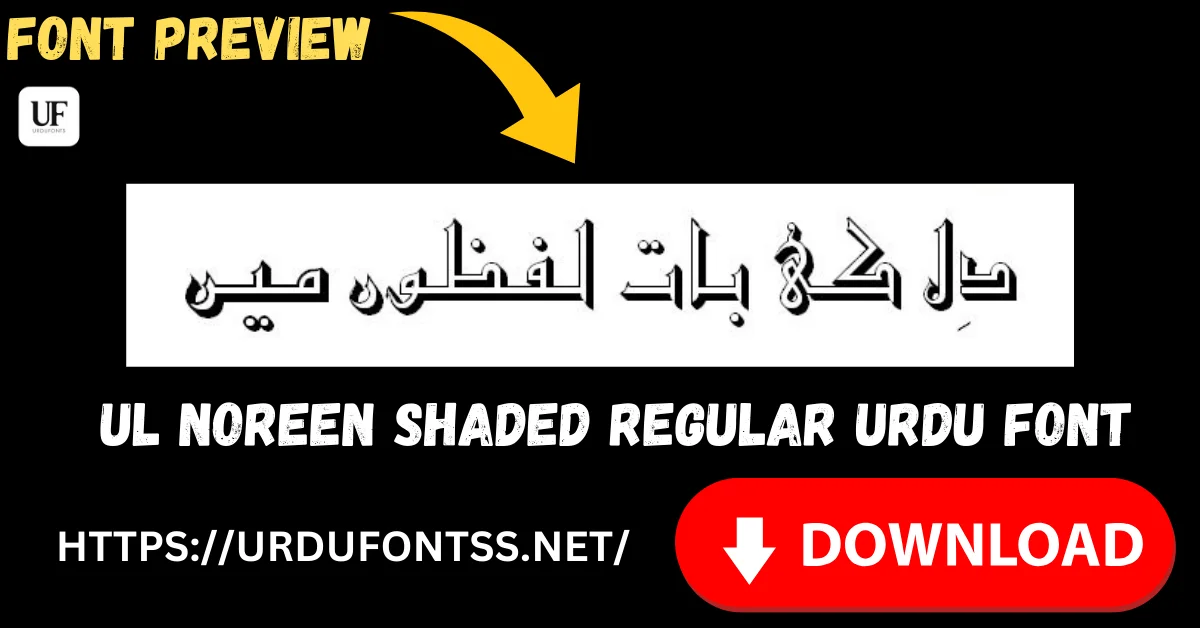
UL Noreen Shaded Regular Free Urdu Font Download (TTF) 2026

UL Noreen Shaded Regular is the heavyweight of the UL display fonts: solid Urdu letters backed by a deep block shadow that throws every heading forward off the page. Where other shaded fonts whisper, this one announces — banners, posters and thumbnails that must be read across a street or inside a busy phone feed. Download the TTF file free below and install it on Windows, Mac or Android.
⚠️ Not to be confused with UL Noreen Outline: this page is for UL Noreen Shaded — solid letters with a heavy shadow. Its same-family sibling, UL Noreen Outline Regular, draws the same style of lettering as hollow outlines with empty middles. Same family name, opposite effect — check the previews before you download.
Table of Content
Table of Contents
UL Noreen Shaded Regular Free Download
| Feature | Details |
|---|---|
| Font Name | UL Noreen Shaded Regular |
| Style | Regular — heavy block-shaded display style |
| Format | TTF (delivered in a ZIP of about 82 KB) |
| Works With | MS Word, InPage, Photoshop, Illustrator, Canva and all TTF-supported software |
| Platforms | Windows, Mac, Android (in apps) |
Before you download, you can also preview UL Noreen Shaded with your own headline in our Live Urdu Font Previews tool — impact fonts should always be judged on the exact words of your banner or thumbnail.
Font Preview
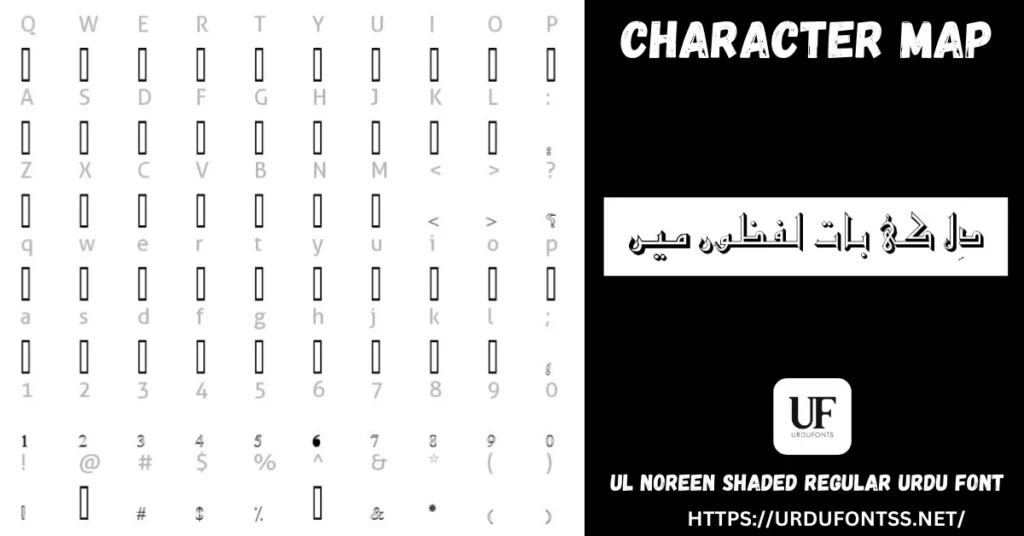
The sample line in the character map shows the effect plainly: chunky letterforms with the shadow built as a solid block behind them. Even reduced to map size, the words punch through — that is the behaviour you are downloading.
What Makes UL Noreen Shaded Regular Different
- Maximum-depth shading: the shadow is not a line but a solid offset block, giving letters a raised, almost carved presence. Next to it, fine-shaded fonts like UL Amjad Shaded look like pencil work; this is the marker-pen version.
- Built for hostile viewing conditions: sunlit shop banners, event posters photographed from the crowd, YouTube thumbnails competing in a feed — heavy shading keeps the headline’s silhouette readable when detail and colour fail.
- The effect is in the font, not your app: no drop-shadow settings, no layer tricks. Type the line, choose the colour, and the shaded result is identical in Word, Photoshop or PixelLab.
- Traditional letterforms under the muscle: beneath the block shadow the lettering keeps a classic Urdu character, so formal announcements still look dignified rather than cartoonish.
- Know its limit: the same weight that wins at headline size collapses at small sizes — the shadow eats the letterforms. Keep it big, keep lines short, and never set body text in it.
Best Uses for UL Noreen Shaded Regular
- Banners and shop signs — headings engineered to be read from a distance, in daylight.
- YouTube thumbnails — a three-word Urdu title that survives being shrunk to phone size; compare it in the preview tool at small size before committing.
- Event and sale posters — announcements where the headline is the whole message.
- Stage and mehfil backdrops — large printed titles with a carved, formal presence.
- Social media quote graphics — one short line set very large over a plain or dark background.
How to Download and Install
On Windows
Click the download button at the top of this page, extract the ZIP, right-click the TTF file and choose Install. Restart your app and UL Noreen Shaded appears in its font list. The full walkthrough is in our PC install guide for Urdu fonts.
On Mac
Extract the ZIP, double-click the TTF and choose Install Font in Font Book.
On Android
Modern Android phones do not allow free system-wide font changes, so use the TTF inside apps such as PixelLab, CapCut or Canva — our Android install guide shows the in-app method step by step. PixelLab is where this font earns its keep: big title text over your thumbnail image.
UL Noreen Shaded Regular vs Similar Fonts
| Font | How It Differs |
|---|---|
| UL Noreen Outline Regular | The same Noreen family with the opposite treatment — hollow outline letters you can fill with colour or lay over photos. Shaded is for solid impact; Outline is for colour and layering. |
| UL Amjad Shaded Regular | Also shaded, but with a fine shadow line over elegant Nastaliq — the choice for wedding cards, covers and certificates where Noreen Shaded would shout too loudly. |
| Trad Arabic Bold Unicode | Heavy without any shading — plain bold Arabic lettering for formal headings and announcements where a shadow effect would feel too decorative. |
Browse the rest of the display shelf in the Urdu fonts category.
Troubleshooting
| Problem | Solution |
|---|---|
| Font not showing in software | Restart the application after installation |
| Letters look merged or unreadable | The size is too small for block shading — enlarge the text, or move that line to a plain bold font |
| Shadow colour cannot be changed separately | The letter and its block shadow are one glyph and take one colour; in Photoshop, duplicate the layer and offset it for a two-colour build |
| Boxes instead of Urdu text | Install the Urdu language pack or check your Unicode support settings |
For the full fix list, see our common Urdu font problems and fixes guide.
Licence Information
| Usage Type | Licence Status |
|---|---|
| Personal Use | ✅ Free to download |
| Commercial Use | Check the font’s licence terms before using it in commercial work |
UL Noreen Shaded Regular is free to download from this page. All rights to the font belong to its respective owner; we do not claim ownership, and this page is provided for preview and informational purposes. If you are the copyright owner and believe any information here needs correction, contact us at urdufontss@gmail.com and we will act on it promptly.
Final Words
If the job is to be noticed — a banner over a busy street, a thumbnail in a crowded feed, a poster on a notice board — UL Noreen Shaded is the loudest voice in this family. Download it, test your headline at the size it will really be seen, and keep everything under the heading in a calm, plain font.
Frequently Asked Questions (FAQs)
Is UL Noreen Shaded Regular free to download?
Yes. The TTF is free to download from the button at the top of this page, in a ZIP of about 82 KB. For commercial projects, check the font’s licence terms first.
What is the difference between UL Noreen Shaded and UL Noreen Outline?
Shaded gives you solid letters with a heavy block shadow — maximum impact for banners and thumbnails. Outline gives you hollow letters with empty middles, made for filling with colour or placing over images. They are different fonts in the same family.
What is UL Noreen Shaded best used for?
Large, short headlines: banners, shop signs, event posters, stage backdrops and YouTube thumbnails — anywhere the text must be read from a distance or at a glance.
Can I use UL Noreen Shaded at small sizes or for paragraphs?
No — the block shadow overwhelms the letters when they are small, and long text becomes unreadable. Keep it for big headings and set everything else in a plain reading font.
How is UL Noreen Shaded different from UL Amjad Shaded?
Both are shaded, but Noreen’s shadow is a bold solid block while Amjad’s is a fine line over elegant Nastaliq. Choose Noreen for impact, Amjad for formal and graceful designs.
Can I use UL Noreen Shaded in PixelLab on Android?
Yes — download the TTF, add it through PixelLab’s font option, and set your title text. Modern Android does not allow free system-wide font changes, so the in-app method is the way to use it.
Can I preview UL Noreen Shaded with my own text before downloading?
Yes — open the Live Urdu Font Previews tool on urdufontss.net, type your own headline, and check the impact at the size your audience will actually see it.

2 Comments